Showing posts with label startup. Show all posts
Showing posts with label startup. Show all posts
Thursday, March 23, 2017
How to Register a Company Startup in India
How to Register a Company Startup in India
Registering a startup or a new business in India first and foremost one has to go by, there are some official procedures a startup or a company has to follow in order to register them in Indian official records, MCA (ministry of Corporate Affairs) has to made registration process online few years back, please find below on how to go about these process when you want to register your company.
One don’t need to visit corporate office, you can apply for registration just sitting at home. We will help you to get a legal license for your business. The registration includes some must follow rules and some registration like Digital Signature Certificate(DSC), Director Identity Number(DIN) and filing for an eform.
4 steps to register:
- Acquiring Digital Signature Certificate(DSC)
- Acquiring Director Identification Number(DIN)
- Filing an eForm or New user registration
- Incorporate the company
It’s necessary to get registered yourself to run your business without any legal problem. India is a land of opportunity, no matter in which field your business is operating the chances of getting success is very high, so it just needs a start. starting an entrepreneurship in India would fetch you great success. fallow this post sincerely till you incorporate your final claim for your company. We assure one will end up in getting their business registered after following this procedure.
Know the basics first: What is mean by company, the private company and public company?
Know the basics first: What is mean by company, the private company and public company?
In India, there are about 7 lacks registered companies and every month thousands of firms apply for registration. company is a legal entity; According to Section 3 of companies act company means a legal entity formed and registered under Companies Act 1956. Under the ministry of corporate affairs, every company is to be registered by the registrar of companies for the state. This act maintains two types of companies called private and public companies. The ‘Limited’ is the most commonly used corporate form at the end of the company name. First you need to know what are these public and private companies and decide how you want your company to get registered.
When it comes to company registration, Every firm will have following two options:
- Private company:
- Public company:
The main differences between Private and Public companies are:
- Minimum number of Board members required for a private company is two and for a public company is seven.
- Private company can have maximum of only 50 members, but a public company can have any number of members.
- A private company can start its business as soon as it is incorporated but the public company shouldn’t start its business until it receives business commencement certificate.
- Private company shouldn’t sell it’s shares to anyone or shouldn’t make any invitation to people regarding a company shares, but a public company can invite people to buy it’s shares by issuing a prospectus.
- Private company may have two directors, but a public company must have at least three directors.
Lets start the registration procedure: 4 Steps
Step 1: Acquire Director Identification Number(DIN)
This is the first process in registration that each director of the company should obtain their identification number. As per the amendment act 2006, acquiring a DIN is compulsory for every director i.e. as such every existing and intending directors have to obtain their DIN. To get DIN one need to file a eForm DIN-1. The DIN-1 form is available on Official site of the ministry of corporate affairs the link is DIN-1 Form.
- Register yourself on MCA Website first and have a login id. After filling DIN-1 Form, one should upload the filled form by clicking to eForm upload button on MCA website and should pay applicable fees.
- After getting generated DIN one should intimate their company about DIN. The director can intimate their company about DIN by using DIN-2 Form.
- Then company should intimate the Registrar of Corporates(ROC) about all director’s DIN through DIN-3 Form.
- If there is any change in DIN or need for any updation like change of address, personal details etc, then director should intimate this change by submitting the eForm DIN-4 Form.
Step 2: Acquire Digital Signature Certificate(DSC):
In order to ensure the security or authenticity of documents filed electronically the information act 200o demands a valid digital signature on the documents submitted electronically. This is the only and safest way that one can submit their documents electronically. The digital signature certificate should be acquired by only those agencies which are appointed by the controller of certification agencies (CCA). One should not use DSC given by any other agency which is not approved and it’s illegal to use others DSC as yours or the false one.If you already have a digital signature then you can use the same, no need to apply for another. But do check for your digital signature validity, agencies issue DSC’s with one or two year validity after expiry you have to renew it.One can acquire his/her Digital Signature certificates from these government listed agencies like TCS, IDBRT, MTNL, SAFESCRYPT, NIC, nCODE Solutions etc. to check out their price details of these Govt approved agencies, Go to this link.
Step 3: Create a account on MCA Portal – New user registration
This is about having a registered user account on MCA Portal for filing a eForm, for online fee payment, for different transactions as registered and business user. Creating an account is totally free of cost. To register yourself on the MCA portal, click on the register link.
Step 4: Apply for the company to be registered.
This is the final major step in a registration of your company which includes incorporating company name, Registering the office address or notice of situation of office and notice for appointment of company directors, manager and secretary. And also regarding the take and pay for their qualification shares.- Form-1:
- Form-1A: Application form for availability or change of a company name. Once you apply for new company name, the MCA will suggest four different form of your company name; you have to choose one among them. To do the same you have you have to fill Form-1A and submit.
- Form-1: This is for application or declaration for incorporation of a company, in this form you have to fill the same name which you have chosen during application of form-1A.
- Form-18:
- This form is for notice of the situation of a new company office or change of situation of previously registered office.
- For a new company you have to fill the form with genuine office address and submit.
- Form-32:
- For a new company, this form is for notice for appointment of new Directors, Managers and Secretary.
- For an existing company, this form is for a change of directors, Manger, Secretary or company head.
After submitting these forms, once the application has been approved by MCA, you will receive a confirmation email regarding the application for incorporation of a new company, and the status of the form will get changed to Approved.
- Form-1A: Application form for availability or change of a company name. Once you apply for new company name, the MCA will suggest four different form of your company name; you have to choose one among them. To do the same you have you have to fill Form-1A and submit.
- Form-1: This is for application or declaration for incorporation of a company, in this form you have to fill the same name which you have chosen during application of form-1A.
- This form is for notice of the situation of a new company office or change of situation of previously registered office.
- For a new company you have to fill the form with genuine office address and submit.
- For a new company, this form is for notice for appointment of new Directors, Managers and Secretary.
- For an existing company, this form is for a change of directors, Manger, Secretary or company head.
Detailed procedure for approval of the proposed company name:
For obtaining name for your new company, An application in Form-1A needs to be filed with the Registrar of Companies (ROC) of the state in which the Registered Office of the proposed Company is to be situated to ascertain the availability of a name along with an official service fee of Rs.500/-.You have to provide four alternative names for the proposed company. Your company name shall not resemble the name of any other company already registered or violate the provisions according to Act, 1950.In this form you have to fill name and addresses of directors (minimum 2 for a private company and 7 for a public company). You have to mention main objects of the company and authorized capital.In about 10 days, the ROC will inform you about approval or objections. If there are any objections then ROC will suggest you with some available names and let you choose among them. If your company name is approved then you will receive a formal letter regarding the confirmation of the same. Keep the same which will be required during registration process of the proposed company.If you find any difficulty or encounter any problem while obtaining the company name then do contact us, We will help you to sort out your problem.
Check these documents before submission of a company:
- DIN of all those directors of a proposed company.
- DSC – Digital Signature Certificate
- Original copy the of formal letter issued by ROC regarding availability of Company name.
- Form-1 for incorporation of a company.
- Form-18 for situation or address of the proposed company.
- Form-32 for particulars of proposed directors, managers and secretary.
Formalities to be followed while incorporation of a company:
- Obtain a TAN card
- Obtain a Permanent account number (PAN) from income tax dept. India
- If required: Documents obeying shop and establishment acts.
- If required: For foreign trade, Registration documents of import export code from Director General of foreign trade.
- If required: Registration documents of Software technologies Parks of India (STPI).
- If required: RBI approval for foreign companies investing in India and FIPB approval.
- Both Indian and foreign directors need to have valid Digital Signature Certificates from authorized agencies.
Available link for download

Thursday, March 2, 2017
How to Remove Startup Programs
How to Remove Startup Programs
How to Remove Startup Programs
It is inevitable that as your computer ages it will soon begin to run slower and slower. While this cannot be prevented entirely, one of the causes you can control is the number of startup programs you have added to your computer. Startup programs automatically run when you start your computer and unless you manually exit them when your computer is on will run in the background. This would not be a problem if your computer had unlimited memory, but since it does not this can be one of the causes of a frustratingly slow computer. Here are the steps you can take to remove some of the unnecessary startup programs you may have added over time to get your computer running faster again.
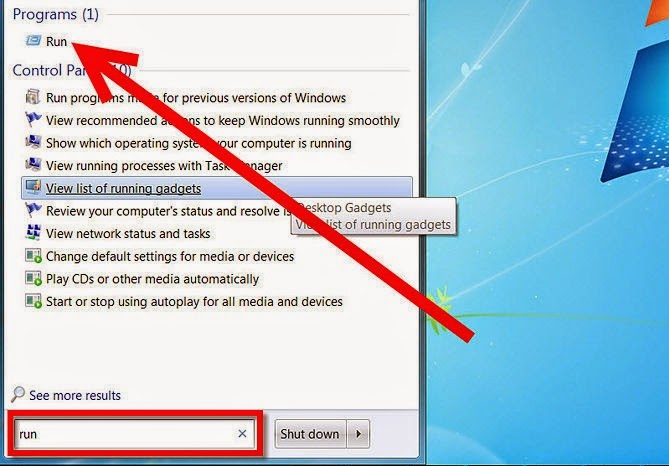
1.Click "Start" in the left bottom corner of the screen; click "Run" (look in the start menu, near the bottom right of the start menu).
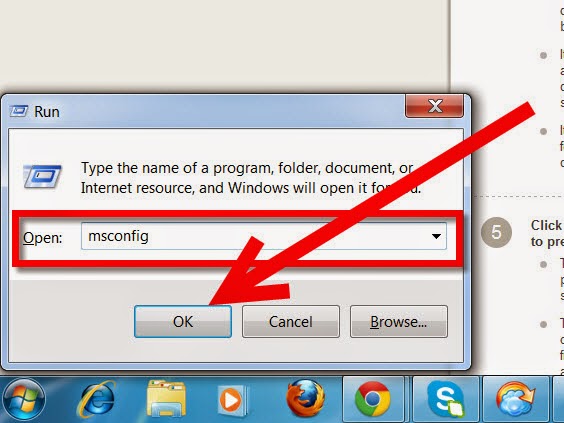
2.Type "msconfig" and then press "Enter."
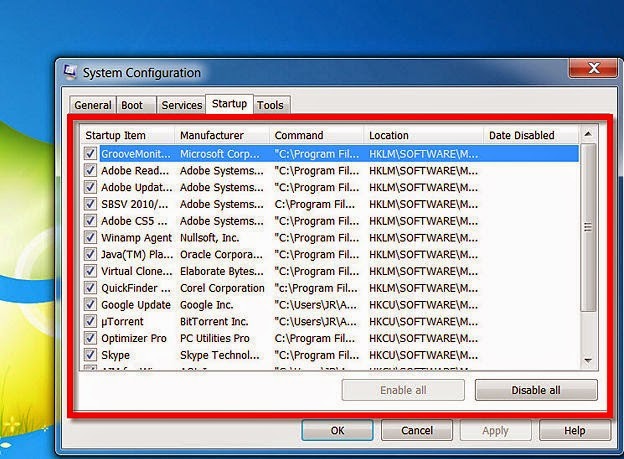
3.Select the "Startup" tab (most likely the second tab from the right).
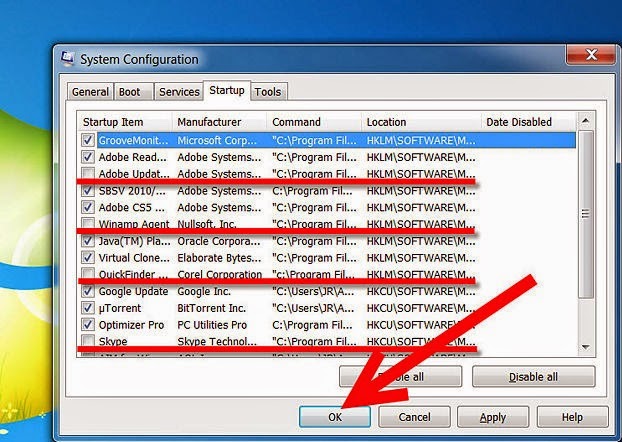
4.Decide what programs from the System Configuration Utility screen you would like to keep running automatically every time your computer starts.
- It is likely that this list contains a number of programs you may not have even realized were running on your computer during startup, or even at all. Over time many computer users download programs that may have been used infrequently or not at all, but that may have been opened during startup for some time without the user realizing it.
- It is important to note that removing these programs from the startup menu is not the same as removing the programs all together. Programs from this list that are unselected can still be opened and used on your computer but will simply not automatically run when your computer starts.
- It is also possible that unless you configured your entire computer yourself (unlikely except for the most knowledgeable computer users) your computer came with a variety of programs of which you have little to no knowledge pre-installed and likely running during startup.
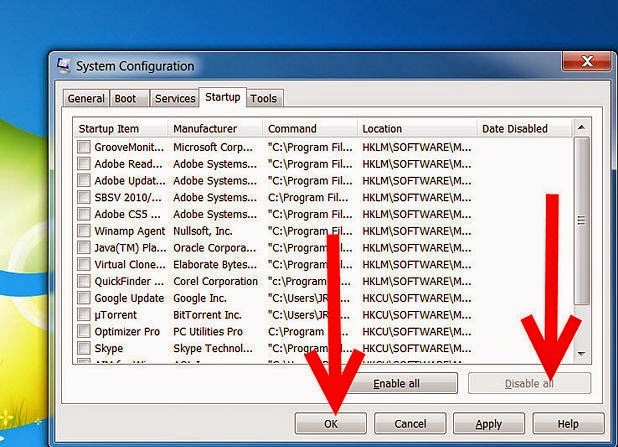
5.Click on "Disable All" in the bottom right corner of the System Configuration Utility screen to prevent every program on the list from running during startup.
- This action should be taken with great caution, as the list likely contains at least a few programs that should almost always be running on your computer, such as anti-virus software, or programs you know you use all the time, such as instant messaging services.
- Taking the steps above will allow you to prevent programs from running every time your computer starts. When your computer is running you can also easily stop these programs from running only for your currently computing session. Programs that are currently running are shown on the taskbar on the bottom right of your screen (you may have to click an arrow pointing to the left in order to show all of them). Right clicking on any of these programs will allow you to close or exit those that do not need to be running at the moment.
6.
Available link for download
Subscribe to:
Posts (Atom)