Showing posts with label business. Show all posts
Showing posts with label business. Show all posts
Friday, April 14, 2017
How To Create a Facebook Page To Promote Your Business
How To Create a Facebook Page To Promote Your Business
How To Create a Facebook Page To Promote Your Business
This article is all about creating a Facebook page, how to create a Facebook page, sometimes referred to as Facebook Fan page also. A Facebook page is a single web page that is hosted by Facebook itself. A Facebook page can be created to promote your small business or any type of business. Sometimes a Facebook page can promote a famous person too.
These days everyone is creating their Facebook page to promote their business, starting from Coca-Cola to Barack Obama, everybody is having a Facebook page. But how do you create a Facebook page? I am writing this article because it is bit tricky to find any link to create a page on Facebook with new interface. So let’s move forward to the process of creating a Facebook fan page.
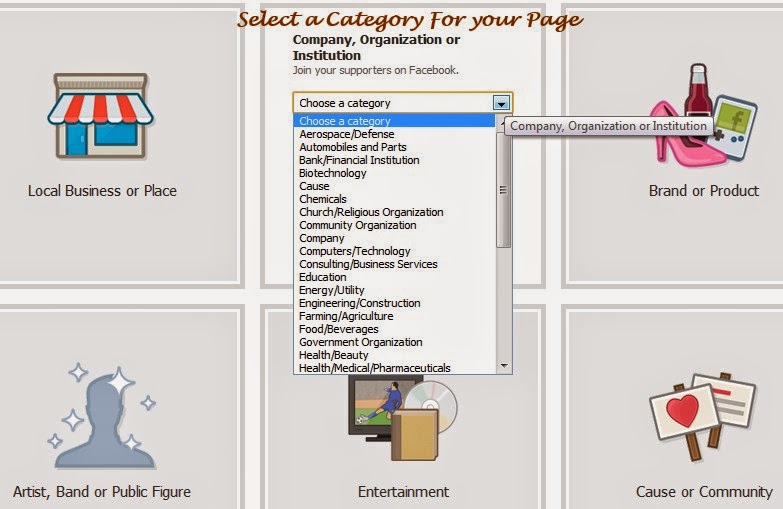
STEPS TO CREATE A FACEBOOK PAGE
Follow these steps to create a fan page, its easy and simple.
Step1: First of all Login to your Facebook account with your credentials.
Step2: After successfully logging in to your account click on this link: Create Facebook Page.This link will take you directly to page creation wizard.
Step3: Click on the type of the page you would like to create for you. You can choose from: “Local Business or Place”, Company-Organization or Institution”, “Brand or Product”, “Artist, Band or Public Figure”, “Entertainment”, “Cause or Community”. When you click on a category you can see another screen in the same page to select a sub category.
Step4: Select your sub category from the drop down menu and give it a name then click on the “Get started button”which will take you to the next screen.
Step5: In this screen you can upload a photo for your page and click on the continue button.
Step6: In next screen you can invite friends and import contacts to your new page and click continue to proceed further.
Step7: In the next screen you need to provide the basic information about page like web site URL etc.
When you are done with all these you can fill all other information in the subsequent screens. That’s all now your Facebook page is ready. Congrats!
You can also read How to get a custom name for your Facebook Fan page for more detail about getting a custom URL.
Available link for download

Saturday, April 1, 2017
G Suite A smart best business platform for business growth
G Suite A smart best business platform for business growth

by Google Cloud
by Google Cloud
All features get together now at one platform- a smartest way to grow your business.
Introducing G Suite from Google Cloud. A set of intelligent apps including Gmail, Docs, Drive and Calendar to connect the people in your company, no matter where in the world they are.
Join G-suit now and get offered services just now to join
click on the below below link and use this 6DERK3QRCAVHYT3 code to get start.
click on the below below link and use this 6DERK3QRCAVHYT3 code to get start.G Suite is a package of cloud-based services that can provide your company or school with a whole new way to work together online—not just using email and chat, but over video conferences, social media, real-time document collaborations, and more. Just sign up for a G Suite account providing the domain name you want to use with Google services. Once you show us that you own the domain, you and your team can begin using Gmail, Calendar, Drive, and other core G Suite services, as well as additional services like Google+, Hangouts, Blogger and more.
?Machine Intelligence that makes business less busy.
Industry-leading machine intelligence is built into G Suite to take care of everyday tasks like automatically scheduling meetings and formatting slides. Its technology that removes the busyness so teams can achieve more.
?Make decisions faster, face to face.
Use shared calendars to see when others are available and schedule meetings with automatic email invites.With one click, turn your meeting into a video conference from any camera-enabled computer, phone, or tablet.Share your screen to review your work as a team, and make decisions on the spot.
?Collaborate in real-time.
Easily work on documents, spreadsheets, and slides across your devices, with or without internet.Work in a single document with teammates or people outside your company. See edits as others type, communicate through built-in chat, and ask questions in comments.Multiple people can work at the same time, and every change is saved automatically.
?Store and share files in the cloud.
Keep all your work in one place with secure access from your computer, phone, or tablet.Quickly invite others to view, download, and collaborate on any file – no email attachment needed.File updates are automatically saved and stored in Drive, so everyone can always have access to the latest version.
?Secure your data and devices.
Protect your company’s data with security options like 2-step verification and single-sign-on, and use mobile management to keep your data safe in the case of a lost device or employee turnover.Archive email messages and on-the-record chats, and control how long they are retained.Easily configure security settings from a centralized administration console, and call or email Google support for help 24/7.
Available link for download
Subscribe to:
Posts (Atom)