Showing posts with label backup. Show all posts
Showing posts with label backup. Show all posts
Tuesday, May 23, 2017
How to take Backup or Restore of Blogger template
How to take Backup or Restore of Blogger template
How to take Backup or Restore of Blogger template
 Today I am going to explain you a simple article about the backup of template from Blogger. Most of the people think that there is no need to take any backup of the template. For this reason I am going to explain you how to take backup of the template ? It is strongly recommend by me or most of the web developer that backup of the template is necessary whenever you are interested to edit it.
Suppose you dont know HTML, CSS or XML like languages and make some mistake in blogger template without any backup then it will provide a great hesitation to you because there is no way to recover that template again. So backup of the template is the only key to protect template from losses.
There are two methods to take backup of the template. We will discuss both two methods here.
Method 1:-
How to restore template from Backup:-z
Method 2:-
Why take backup of template:-
How to Take Backup of the Template:-
Method 1:-
- Login to Blogger Dashboard.
- Go to Design / Edit HTML.
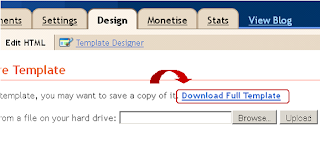
- Click "Download Full Template"
Save file (.xml) in your local computer.
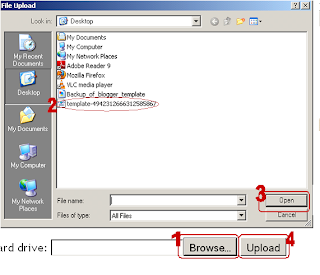
How to restore template from Backup:-z
- Click "Browse" button and open file saved in step 4.
- "upload" button.
- AHit nd finally you have done.
Method 2:-
Generally this is not a predefined method but this is preferred by most of the Web developer.
Hit "Expand Widget Template".
Select and copy the whole blogger template.

And Paste the whole code in any text editor like notepad or wordpad.
I think this article will definitely helpful for you. If you like the above article then dont forget to subscribe it for latest updates.
Hit "Expand Widget Template".
Select and copy the whole blogger template.
And Paste the whole code in any text editor like notepad or wordpad.
I think this article will definitely helpful for you. If you like the above article then dont forget to subscribe it for latest updates.
Available link for download

Saturday, April 29, 2017
Computer Me Windows Ka Backup Kaise Bnaye
Computer Me Windows Ka Backup Kaise Bnaye
Computer Me Windows Ka Backup Kaise Bnaye
hello dosto aaj mai aap logo ke liye aisa tricks lekar aaya hu jiski madad se aap aasani se apne windows ka backup bna sakte hai aur agar aage chal kar koi bhi dikkat aaye to hum restore karke apne ko phir se sudhar kar sakte hai to dosto aap bhi jarur bnale apne computer ka backup ye bahut jaruri hota hai

Windows Ka Backup Kyo Jaruri Hai
aur mai un bhaeyo se kehna chahta hu jin man ye sawal aaya hoga hum computer ka backup kyo Bnaye ye sawal sayad bahud aadmi ke dimag me hoga isliye mai unka Jawab bhi de raha hu taki wo bhi apne computer (pc) ka backup bnale
hum apne computer ka backup isliye bnate hai kyo agar aapka koi bhi file ya setting me agar problem aaja ye to hum apne computer ka purana(old) backup le sakte hai ye jo hota hai hamare computer ka jitna bhi files hai uska copy tayar karke rakh leta hai jisko hum
System Image Kehte hai ye System Image kaise bnate hai
Windows Ka Backup Kaise Bnaye Sikheye Hindi Me
Step 1: Sabse pehle aapko Control panel ko open kare
Control Panel Ko open karne ke liye aapko start buttom
par click karke Control panel search mare uske bad open kare
Step 2: uske bad aapko System And Security click karna hai
uske bad aapko Backup and Restore par click karna hai

Step 3: uske bad aapke samne Create a System Image ka
ek option dikhae dega usper aapko click karna hai kuch aisa

Step 4: ab aapko apna drive select karna hai jisme aap apna
Backup ko bnake rakhna chahte hai wo drive ko select kare

Step 5: ab Next ya Start Backup ke buttom par click karna hai
ab aapko kuch karne ki jarurat nahi aapka backup kuch second
ya minute me tayar ho jayega aur agar aap apne computer ka
purana (old) backup banaye hai to usko delete karne ki koi jarurat
nahi hai kyoki new backup bnane ke bad purana backup automatic
delete ho jata hai
Ye Post Bhi Padhe:
Computer Ki Aur Tricks Ke Liye Yaha Click Kare
Android Mobile Ke tricks Janne Ke Liye Yaha Click Kare
Mobile Me Recharge Tricks Ke Liye Yaha Click Kare
ummid karta hu dosto ye tricks aapko jarur pasand aaya hoga aap hamare website ko subscribe karna naa bhule aur facebook page ko like karna naa bhule
Available link for download
Subscribe to:
Posts (Atom)