Showing posts with label print. Show all posts
Showing posts with label print. Show all posts
Monday, June 26, 2017
Aadhar Card Print
Aadhar Card Print
Now, UIDAI have given the facility to take a print out of Adhar Card. Now any individual received adhar number can download and take a print of adhar card.
How to take Adhar Card Print. For Aadhaar Card print, You need to follow some steps.
For Taking Adhar Card Print Out. Firstly you have to download adhar card online.
For downloading E-Aadhar Card Visit on the link: http://eaadhaar.uidai.gov.in/eDetails.aspx
Once the link is opened enter the data required on the website i.e. mainly
Once the link is opened enter the data required on the website i.e. mainly
- Enrollment Number
- Date and Time
- Resident Name
- Pincode
- And Finally you have to enter the text shown.
When the form details filled by you, Press Submit you will be redirected to another page mainly the verification part where you have to verify your registered mobile number. After complete verification and entering right One Time Password (OTP). you will be able to download your Aadhaar Card.
Once the Card is downloaded. Simply open the file and take Adhar Card Print Out.
Available link for download

Thursday, May 25, 2017
How to Get Aadhaar Card Print Out Offline
How to Get Aadhaar Card Print Out Offline
Getting your Aadhaar Card Print Out Online is very easy for that you just need a computer or laptop, internet connection and a printer. But what if you don’t have such facility at your home, still you may not worry as without computer or laptop, internet connection and printer you can get your Aadhaar Card Print Out Offline.

So we will guide you on how to get aadhaar card print out offline.
Get Aadhaar Card Print Out Offline
First of all to get aadhaar card print out offline you will need the Aadhaar Card Acknowledgement Slip which you have received after registering yourself for Aadhaar Card.
Just take the Aadhaar Card Acknowledgement Slip with you and walk in to any nearest Internet Cyber Café in your area, and ask them to download and print out your Aadhaar Card.
To download your Aadhaar Card they will ask you to provide your Aadhaar Card Acknowledgement Slip, jut hand over it to them and they will download your Aadhaar Card Copy and give you print out of your Aadhaar Card. You can even ask them to laminate the Printed Aadhaar Card.
Once they give you your Aadhaar Card Print Out, don’t forget to take your Aadhaar Card Acknowledgement Slip.
That’s it this is how easily you can get Aadhaar Card Print Out Offline.
Also Read: Open Aadhaar Card PDF File in Photoshop
So we will guide you on how to get aadhaar card print out offline.
Get Aadhaar Card Print Out Offline
First of all to get aadhaar card print out offline you will need the Aadhaar Card Acknowledgement Slip which you have received after registering yourself for Aadhaar Card.
Just take the Aadhaar Card Acknowledgement Slip with you and walk in to any nearest Internet Cyber Café in your area, and ask them to download and print out your Aadhaar Card.
To download your Aadhaar Card they will ask you to provide your Aadhaar Card Acknowledgement Slip, jut hand over it to them and they will download your Aadhaar Card Copy and give you print out of your Aadhaar Card. You can even ask them to laminate the Printed Aadhaar Card.
Once they give you your Aadhaar Card Print Out, don’t forget to take your Aadhaar Card Acknowledgement Slip.
That’s it this is how easily you can get Aadhaar Card Print Out Offline.
Also Read: Open Aadhaar Card PDF File in Photoshop
Available link for download
Wednesday, May 24, 2017
How to Print Things on a Computer
How to Print Things on a Computer
How to Print Things on a Computer
There are people who have trouble printing things off from a computer. It may be an easy task for some, but to others it is frustrating. Here are some instructions to help.
1.Write or copy and paste what you want on Microsoft Publisher or Word or anything like that.

2.Save what you have created.

3.In the corner, you will see a piece of paper or "Print" button. You will need to click this in order to print your work.

4.Make sure your computer is connected to the printer, there is several pieces of paper inside it, and that the printer is plugged in and turned on.

5.Put on how many copies you want.

6.Press on the "Print" button and wait for a few seconds/minutes and youre done.

Available link for download
Tuesday, April 18, 2017
How to Take Aadhaar Card Print Out Online
How to Take Aadhaar Card Print Out Online
If you have still not received your Aadhaar Card through post you can take Aadhaar Card Print out online in few simple easy steps. So in this article we will guide you throughout the process on How to Take Aadhaar Card Print out Online.
First of all to be able to Take Aadhaar Card Print out Online you should have your Aadhaar Card Enrollment Acknowledgement Slip or your Aadhaar Card Number, and if you have these details or documents available with you than in few clicks you will be able to print your Aadhaar Card Online.
You can take print out of your Aadhaar Card Online by Aadhar Card Print out Online by Aadhaar Number or Aadhar Card Print out Online by Aadhaar Enrollment Number.
Steps on How to Take Aadhaar Card Print out Online (Aadhar Card Print out Online by Aadhaar Number or Aadhar Card Print out Online by Aadhaar Enrollment Number)
Your downloaded e-Aadhaar PDF will be valid as the original Aadhaar Letter.
Also Read: How to Get Aadhar Card Print Out Offline
First of all to be able to Take Aadhaar Card Print out Online you should have your Aadhaar Card Enrollment Acknowledgement Slip or your Aadhaar Card Number, and if you have these details or documents available with you than in few clicks you will be able to print your Aadhaar Card Online.
You can take print out of your Aadhaar Card Online by Aadhar Card Print out Online by Aadhaar Number or Aadhar Card Print out Online by Aadhaar Enrollment Number.
Steps on How to Take Aadhaar Card Print out Online (Aadhar Card Print out Online by Aadhaar Number or Aadhar Card Print out Online by Aadhaar Enrollment Number)
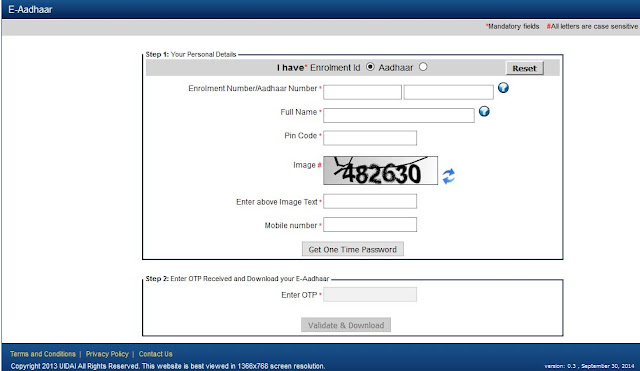
- To download electronic version of your Aadhaar open your web browser on your computer or laptop and visit https://eaadhaar.uidai.gov.in/.
- Once you are on the e-Aadhaar download page just select I have enrollment number or aadhaar number (according to which details you have with you), enter the Enrollment Number/Aadhaar Number in the below field and other details like Full Name, Pin Code, Solve the Image by typing it in below text field, mobile number and hit on get one time password.
- Once you receive one time password on your registered mobile number just enter the OTP received on your mobile number in below enter OTP field and click on validate and download.
- Once you hit on validate and download your e-Aadhaar PDF file will get downloaded on your computer or laptop.
- Make sure you have Adobe PDF Reader Installed on your Computer or Laptop and open the e-Aadhaar Card PDF downloaded. Once the Aadhaar Card PDF document opens up with Adobe PDF Reader it will ask you to enter the password to view your Aadhaar Card PDF.
- Password to open your Aadhaar Card PDF will be your address postal code, once you enter the password you will be able to view your Aadhaar Card PDF.
Your downloaded e-Aadhaar PDF will be valid as the original Aadhaar Letter.
Also Read: How to Get Aadhar Card Print Out Offline
Available link for download
Subscribe to:
Posts (Atom)