Showing posts with label e. Show all posts

Sunday, June 25, 2017

About E Mitra

About E Mitra


E-Mitra is an ambitious E-governance initiative of Government of Rajasthan (GoR) which is being implemented in all 33 Districts of the state using Public-Private Partnership (PPP) model for convenience and transparency to citizens in availing various services of the Government and Private Sectors under a single roof at their door steps using an e- platform. The services are delivered via counters known as CSC (Common Service Center) kiosks in Rural Areas and e-Mitra kiosks in urban areas and also online via www.emitra.gov.in. Hence, these counters provide services related to various departments in an integrated and easily accessible manner to people residing in rural as well as urban areas without any need for running around in government offices. The project has been operational since 2005. Initially it was functioning through a Client Server based Application Software developed by Department of IT&C. In 2010, the old Client Server Application was migrated to Web-based on-line e-Mitra application across all the 33 districts. Recently, a new generic module has been added to e-Mitra portal which allows end to end application and delivery of "Digitally Signed Certificates" such as Bonafide, Caste, Income, Solvency etc.

emitra kiosk,  kiosk pay point registration, emitra paypoint, pay point emitra registration,  kiosk registration, Emitra Paypoint Kiosk, Kiosk Pay point Emitra, kiosk registration

____________________________________________

Following  type of services currently being delivered through eMitra platform:  

Utility Bill & other types of Payment Collection.


Submission of Online Application Forms & Fee Deposits.


Submission of Grievances/Information Retrieval.


Various Certificates & copy of Land Records.


Pre –paid services (mobile/TV recharge, LIC, ticket booking, etc.)


Currently, more than 50 services of approximately 30 Government departments/ PSUs/ private service providers are being offered through eMitra portal. In addition to the services (G2C+B2C) available on e-Mitra portal, the Kiosks shall also be delivering following services as per the rates approved by GOR:


Bhamashah Services

Data updation & enrollment


Card printing & lamination


Banking services

Aadhar enrollment

Business Correspondent (BC) services

Various digitization/scanning work 


Available link for download

Read more »

Thursday, June 22, 2017

e Aadhar Creation by online Information

e Aadhar Creation by online Information


 e-Aadhar


It is useful to verify your Aadhar Card MOre information About The Aadhar Card...
check your Aadhar Card is Original or not...

Know Before You Download
  • Is your Aadhaar Approved?
    Not sure? click here to know status of your Aadhaar
  • You need Adobe Reader to view e-Aadhaar. Do you have Adobe Reader installed?click here to download Adobe Reader

Click Here

Step 1 : Your Personal Detail--
Step 2 :--After filling Form You Get One Time Password Note it and Use in The 2 nd Step

Available link for download

Read more »

Wednesday, June 14, 2017

E Aadhaar Letter

E Aadhaar Letter


After a long wait of time, UIDAI has finally been able to launch its e-Aadhaar portal through which people who have enrolled for Aadhaar and have been waiting for their Aadhaar letter can easily download their Aadhaar letter online and use it anywhere by just taking a printout of the same. To download the Aadhaar letter, it is necessary to have both your enrolment number and date time of your enrolment. If you know your Aadhaar Number then also you can download your Aadhar card online. The complete procedure for downloading your Aadhaar letter or Aadhar card online is pointed below.
1. Make sure that you have your enrollment number and the date-time of enrolment or your Aadhaar number with you in order to proceed for downloading the e-Aadhaar letter. These details can be found on the acknowledgement slip which you got from the enrolment centre after enrolling for Aadhaar.
2. Now there are two situations. First is that you have your Enrollment Id details and the Second is you know your Aadhaar Number. In Either case you can download your E-Aadhaar letter.
3. E-Aadhar Card Downloading process consists of 2 Steps.
Step 1: Your Personal Details
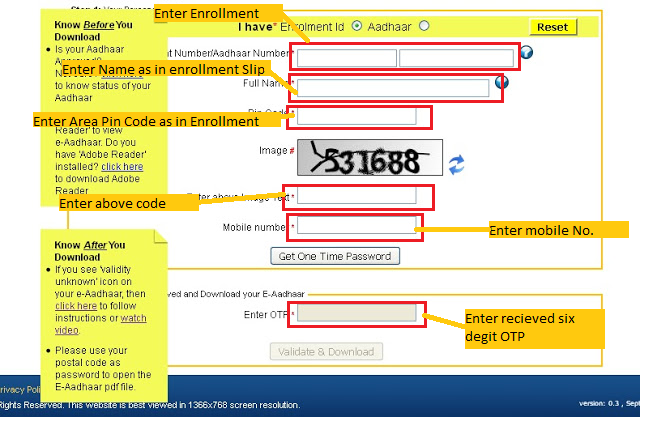
4.(a). If you have Enrollment ID (enrollment number and date-time of enrollemnt), then fill in your details like enrolment number, date time of enrolment, your full name, your Pin Code, the captcha code (image text) and your mobile number in the respective fields and click on the ‘Get One Time Password’ button. You will receive a One Time Password (OTP) on the mobile number you just entered. This is essential for verification process.
4.(b). If you know your Aadhaar Number then select the radio button put in front of ‘Aadhaar’ (second radio button on the second line yellow in colour). Then fill in your Aadhaar number, full name, Pin Code and the captcha code (image text) in the respective fields and click on the ‘Get One Time Password’ button. You will receive a One Time Password (OTP) on the registered mobile number. This is essential for verification process.
Step 2: Enter OTP Received and Download your E-Aadhaar
5. Type the OTP you received on your mobile and click on ‘Validate & Download’ button.
6. After that you will be provided with a link to download your E-Aadhaar letter (in PDF format) and to open it you will need to enter your ‘Pincode’ as the password.

Available link for download

Read more »

Sunday, June 4, 2017

How to download e Aadhaar Card PDF online with new mobile number

How to download e Aadhaar Card PDF online with new mobile number


Most of the people are having trouble in downloading their Aadhaar Card as the mobile number which they have given to enter while enrolling their Aadhaar Card have now been changed or some people mobile number been barred or any other reasons.

Download e-Aadhaar PDF with New Mobile Number

So these people who comes under this category now may not worry, they may now download their e-Aadhaar Card PDF File online with new mobile number, they can enter their new mobile number so that they will get the One Time Password (OTP) on their new mobile number to confirm and download their Aadhaar Card.

Below in the screenshot we have mentioned the exact process what you should do to download your Aadhaar Card PDF by entering new mobile number.


  • Go to https://eaadhaar.uidai.gov.in/, and follow the process in the screenshot

download e-Aadhaar Card PDF online with new mobile number

Also Read: How to Download Aadhar Card Without Enrollment Number

Available link for download

Read more »

Wednesday, May 31, 2017

Download E aadhar by Enrollment No

Download E aadhar by Enrollment No


First visit offcial webpage of UID, and click on get e- aadhar card. 
                                                (OR)
Visit direct webaddress of download E-aadhar  https://eaadhaar.uidai.gov.in/
After the above  process, you get dialog box to feed required data related to your adhar.


?Follow these below steps to get your aadhar card by enrollment no.


              ?  feed enrollment number

              ?  feed name

              ?  feed Area pin code of adhar

              ?  enter Captch code

              ?  enter mobile no. on which OTp will be sent

              ?  press "Get OTP" and wait till message received

              ?  enter OTP no. in the box and press "Validate and Download"


    Available link for download

    Read more »

    Thursday, May 18, 2017

    Remove e Aadhaar Card PDF File Password

    Remove e Aadhaar Card PDF File Password


    People are asking this question the most “how to remove e-Aadhaar Card PDF document file password”, when every time they open their e-Aadhaar Card PDF File document it asks the password in the password prompt. So we will help you in this topic on how you can remove the password from the e-Aadhaar Card PDF password protected file.


    Remove e-Aadhaar Card PDF File Password

    Here is an important article which you can go through to remove your Aadhaar Card PDF file password to know click here.


    Also Read: Aadhaar Card Online Correction Status

    Available link for download

    Read more »

    Wednesday, May 10, 2017

    How to Validate Signature in E Aadhaar

    How to Validate Signature in E Aadhaar


    ??? ???? ???? ???? ????? ??????? ?? ??????? ???? ?? ?? ???? ???????? valdity Unknown ??? ?? ? ??? ?? ?? ??? ?? ?????? ??? ?? ???? ??

     ???-???????? Validate ???? ?? ??? ????????? ?? ??????? ?? ?????? ???? ?????? ?? 
    • ???? ???? ???? ????  ??? ???? ????? ?? ??? ???? 
    • Validity Unknuwn  ?? ???? ????? ????? 
    • Validate Signature ?? ??? ????? 
    • Signature properties ?? ????? ????? 
    •  ??? ??? ?? ??? ??? ?? Signer ?? ????? ?????
    • ?? show  Certificate  ?? ????? ?????  
    • ??? ????? ??? ???? ??? ??? ?? Trust ?? ????? ???? 
    • Add to Trusted Identities ?? ????? ???? Ok ?? ????? ????? 
    • ??? ?? ??? ????? ?? ??? Ok ?? ??? ?? ????? ????? 
    • ??? ok ?? ????? ???? Validate Signature ?? ????? ????? 
    • Validate Signature ?? ????? ???? ?? ???? ???? ??? Validity Unknown ?? ????? ?? Signature Valid  ??? ??? ?? ????? ?? ??????? 

      ?? ???? ?? ??? ?????? ??? ?? ??? ???? ???  


      To Validate Signature in E Aadhaar You  can use these steps-


      Note- Computer must be connected to internet while validating digital signature.
      1. Right click on the validity unknown icon and click on Validate Signature.
      2. You will get the signature validation status window, click on Signature Properties.
      3. Click on Show Certificate..
      4. Verify that there is a certification path named NIC sub-CA for NIC 2011, National Informatics Center. This identifies NIC sub-CA for NIC 2011, National Informatics Center as the owner of the digital certificate that has been used when signing the document.
      5. Mark the certification path named NIC sub-CA for NIC 2011, National Informatics Center, click the Trust tab and then Add to Trusted Identities.
      6. Answer OK to any security question that follows.
      7. Check(?) the field for Use this certificate as a trusted root and click OK twice to close this and the next window.
      8. Click Validate Signature to execute the validation.
      9. Now this will show Signature Valid.
      Note: - Once NIC sub-CA for NIC 2011, National Informatics Center has been as a Trusted Identity, any subsequent documents with digital signatures from CCA will be validated automatically when opened.
      You can watch video given below


      Available link for download

      Read more »

      Tuesday, May 9, 2017

      How to Download E Aadhar Card Online

      How to Download E Aadhar Card Online


      Download E-Aadhar Card eaadhaar.uidai.gov.in

      Aadhar Card is very important document at this time in India. Aadhar Card is free of cost and lots of benefit. Welcome to www.iaadharuidai.blogspot.in, In this article we will discus about How to Get E-Aadhar Card. If a person has already enrolled through registered uidai enrollment center/ authorized aadhar enrollment center and their Aadhar Number has been generated then He/She can Get E-Aadhar Card Instantly Online.

      How to Get E-Aadhar Card

      Online process of Download E-Aadhar Card is very simple and any one can be done by follow the step to get E-Aadhar. Applicants can easily download e-adhar card in Computer/PC and Smart Phone/ Mobile.

      Download Aadhar Card Online
      Apply New Aadhar Card
      Take An Aadhar Card Appointment

      How to Download E-Aadhar Card

      To Download E-Aadhar Card, go to the main web-portal of Unique Identification Authority of India (UIDAI). Aadhaar Kiosk! is resident uidai web-portal, through the Aadhaar Kiosk! you can get your e-aadhar card if your aadhar number has been generated.


      Web-portal of Aadhaar Kiosk! - https://resident.uidai.net.in/

      Step to Get E-Aadhar Card

      There are 5 easy step to download E-aadhar card online.

      1. Aadhaar Kiosk!
      2. GET E-Aadhaar
      3. Fill Require Details
      4. Get OTP
      5. Verify & Download

      Read Also
      Check UID Status Now
      Update Your Aadhar Card
      Check Aadhar Update Status

      In Details to Get E-Aadhar Card

      1. In first, go to the Aadhaar Kiosk! web-portal of Unique Identification Authority of India (UIDAI) which is - resident.uidai.net.in/.

      2. In second, click on the "Get E-Aadhaar" to get e-aadhar card in your computer/ mobile. Also click on the direct link of "Get E-Aadhar" to get in pdf format.

      E-Aadhaar Link - https://eaadhaar.uidai.gov.in/

      3. In third, there are 2 option to get e-aadhar card/ pdf aadhar card.

      Download by Enrolment Number
      Download by Aadhar Number


      Download E-Aadhar Card by Enrolment Number -
      If you have Enrolment Number then select Enrolment ID to download e-aadhar card in pdf format.

      Download E-Aadhar Card by Aadhar Number -
      If you have Aadhar Number then select Aadhaar ID to download e-aadhar card in pdf format.

      After select this option, fill all details in this form.
      Required details are -
      Enter 14 digit Enrolment Number printed on acknowledgment slip/ 12 digit Aadhaar Number.
      Enter Full Name show in acknowledgment slip.
      Enter your post office PIN Code.
      Enter image test code show in image.
      Enter Registered Mobile number.

      4. In forth, click on the get one time password.

      5. at last, Enter OTP Received on your mobile number and Download your E-Aadhar card by click on Validate & Download.

      So if you need a digital copy of aadhar card (E-Aadhaar) then follow the easy steps given above to get it. Download E-Aadhaar by Unique Identification Authority of India web portal.

      Important Links For You
      How to Change Address in Aadhar Card
      How to Update Data in Aadhar Card
      How to Apply Online

      Thank you for visiting on www.iaadharuidai.blogspot.in. More information about download e-aadhar card comment please.


      Available link for download

      Read more »

      Monday, May 1, 2017

      Download E aadhar by Adhar number

      Download E aadhar by Adhar number


      To Download Aadhar Card Online |

      See and follow Procedure Below for Downloading your E-Adhar Card Online:


      "It might be taking a lot of time for your Aadhaar Card to be delivered at your home, but you need not wait for your Aadhaar Card, you can now Download Aadhar Card by simple steps. All you are required is to provide with your mobile number while enrolling yourselves. This will enable you to download AADHAAR Card duplicate copy or e-AADHAAR card which would be provided from UIDAI website."

      ?Aadhar Card print is now so easy for the Indian Citizens. For this purpose, we are introducing you with this update, which will tell you about Aadhar Card Online Application tracking as well as How to download the duplicate Aadhar Card or Copy of Aadhaar Card.
      The good thing about Aadhaar is that unlike some other identity cards, its digital copy, downloaded from the UIDAI website, is as valid as the original card. So whether you’ve misplaced your card and need a new one, or just wanted to get a digital copy of the card to submit with a form online, the official website has you covered.

      First you need to visit Adhar Card Downloding link: eaadhaar.uidai.gov.in/ is the Website  to get your eAadhar Card. Where you will see as detailed below:


      ?Once you are on the site, follow these 5 Steps to get your e-Aadhar Card Download:
      Step 1:?
      Select /click on "Adhar No." redio button.
      Step 2:?
      Feed adhar card no. number which you got in mobile  by sms OR in email or prited on your lost aadhar card.
      Step 3:? 
      Feed name as accualy priten on your Adhar card or As given at the time of enrollment Your Adhar Card.
      Step 4:? 

      Feed Area pin code of adhar as accualy given or priten on your aadhar card
      Step 5:?  
      Enter Captch code as shown on screen if first the given code show wrong then click on referees button and get new Captcha Code. And then enter them.
      Step 6:? 
      Enter regidtered mobile no. as given at time of registration/ enrollment of Aadhar Card to receive OTP.
      Step 7:?
      Press "Get OTP" and wait till message received.
      Step 8:?
      After successfully received OTD please enter OTP no. in the box and press "Validate and Download".
      __________________________________________
      Here are a few important instructions that you need to keep in mind after you are done with E-Aadhar Card download:


      Available link for download

      Read more »

      Monday, April 24, 2017

      How to Download E Aadhaar Card Letter

      How to Download E Aadhaar Card Letter


      If you have checked your Aadhaar Card Status and if its showing it have been printed than at that time only you can easily download your Aadhaar Card Letter Online and Print your Aadhaar Card and Start using it.

      Download Aadhaar Card

      To download go to this link http://eaadhaar.uidai.gov.in/eDetails.aspx just enter the Enrollment Number including Date, Time and Seconds which is specified in Enrollment Acknowledgement Slip you will also have to enter your full name, pin code exact mentioned in the Slip and than click on submit button than next screen it will show your mobile number if its correct you click yes if its not correct you will have to click no and after you will get a new window to enter your new mobile number after entering it will send you a OTP number to your mobile to verify (OTP means One Time Password) within few minutes you will receive the OTP number on your mobile than you will have to enter the OTP number than click next the window will appear showing download button.

      Click on Download button and your Aadhaar Card Letter will Start Download after you will have to open the document with PDF Reader as it will be in PDF Format when opening the Document it will ask you the password, password will be your Postal Pin Code.

      Than you can print your card and if you want you can also laminate it and use it for various purposes, now no need to wait for the Aadhaar Card to get posted to your Postal Address.

      Also Read: Check Aadhaar Card Status Online by Enrollment


      Available link for download

      Read more »

      Sunday, April 9, 2017

      How to Download E Aadhaar by Name and Email id

      How to Download E Aadhaar by Name and Email id


      Now you can Download your E-Aadhaar by Name and Email id . If you have already registered your email id in Aadhaar  then you can download your E Aadhaar by name and email id. To download E Aadhaar card follow these steps:-
      • First you have to find  EID of your Aadhaar. To Find EID Click Here
      • New Tab Open and shown as? 
       
        • Enter your name , Email id and security code.
        • Click on Get OTP. 
        • Now enter OTP You Received on Email id and Click on “Verify OTP”
        • After it you will get a SMS in Email id with your Enrollment ID. 
         After getting Enrolment id (EID) Follewthese Steps
        • Go To UIDAI website At https://eaadhaar.uidai.gov.in/
        • If you have Enrolment Number than you click Enrolment id Radio Button.
        • Now enter your Enrolment id  with Date & time.
        • In Next Box Enter your Name shown on acknowledge Slip.
        • Enter Security Code (Image Code) And your aria pin code .
        • Enter Mobile No. to receive O.T.P.
        • After Filling all information Click on Get One Time Password .
        • Enter O.T.P. Received on Mobile And click Validate & Download  
        • Now your E Aadhaar downloaded into your computer . Open it in Adobe Reader.  
        Click Here To Download E Aadhaar 
        •  

        Available link for download

        Read more »

        Monday, April 3, 2017

        Get Aadhar on E mail id

        Get Aadhar on E mail id


         ?Steps to get e-Aadhaar in email:

        1. If you have earlier checked your Aadhaar status and your Aadhaar is generated, follow the steps provided else first check your aadhaar status

        " If you dont know your aadhaar number, then follow these steps" :

        Type UID EAADHAAR < 14 digit enrolment number>   < email Id > < PIN code > on your mobile and send it to 51969.

        "SAMPLE MESSAGE => UID EAADHAAR 12345678910123 abc@xyz.com 123456 and send to 51969"


        If you know your Aadhaar number, then:

        Type UID EAADHAAR < 12 digit Aadhaar number>   < email Id > < PIN code > on your mobile and send it to 51969.

        After above process-
        You will receive the Aadhaar in your email id.
        Once e-aadhaar downloaded, open it woth Adobe Acrobat Reader.
        It will ask for password. The password for e-Aadhaar card is the pincode of your area.


        Available link for download

        Read more »

        Saturday, March 25, 2017

        e Aadhar Card Download Online Aadhaar Card Download Online

        e Aadhar Card Download Online Aadhaar Card Download Online


        If you’ve enrolled for an Aadhar card and haven’t received it yet, Here’s a good news for you. UIDAI now enables you to generate an e-Aadhar Card from the official site. It functions similar to the actual Aadhar card, you can print it out.
        Various public sector undertaking services including Banking, NEFT, Money Exchange, Subsidy Registration, Gas and Power Subsidy e.t.c require Aadhar number as a mandatory aspect. e-Aadhar Letter provides a digital alternative for these services before the delivery of the original copy.

        Download your e-Aadhar Card Letter Online

        Before downloading the digital copy, you need to make sure your actual card /number is processed and out for delivery. You check the status here.
        • First Browse to the Official e-Aadhar Portal (UIDAI Portal).
        • You need to input your enrollment number along with Date/ Time of enrollment.
        • You can find these details on your acknowledgement slip provided.
        • You need to enter your name and Pin code as well along with the verification captcha.
        e-Aadhar Card
        • Hit Submit. The subsequent step is to verify your mobile phone number.
        • Last four digits of your enrolled mobile number will be displayed.
        • You can either choose Yes (If the displayed number is accessible) or No, if you wish to configure your number.
        • After verification, a verification code (One time Password) will be delivered to your mobile phone.
        • Input the verification code in the “OTP No.” text field.
        • You will be granted access to download the e-Aadhar Card PDF file.
        The PDF file may be password locked. Input your Pin code to unlock the respective file. You can either print it out for an alternative of the original copy or upload the PDF copy while online service registration.

        Available link for download

        Read more »

        Wednesday, March 22, 2017

        How to Remove E Aadhaar Pdf File Password

        How to Remove E Aadhaar Pdf File Password


        When you open E Aadhaar Pdf file it asks the password in password prompt every time. If you want to open E Aadhaar pdf file without password , you need to remove password from E Aadhaar pdf file . You can easily remove E Aadhaar pdf Password Online .
        There are two ways to remove pdf password.
        http://aadhaarcorrection.blogspot.in/2015/10/how-to-remove-e-aadhaar-pdf-password.html

        1. Online from Website. 

          • First open the website http://www.pdfunlock.com/ 
          • Upload pdf file from Computer or Dropbox or Google Drive.
          • Click on Unlock Button 
          • Enter Your pdf Password (Only once) 
           
          http://aadhaarcorrection.blogspot.in/2015/10/how-to-remove-e-aadhaar-pdf-password.html
          • After entering pdf Password Click Unlock
          • Now your Unlocked E Aadhaar  pdf file will be download into your Computer.
          • Save it and Open it without Password.
           
        2. Pdf Unlocker Software. 

          • You Can Unlock your pdf file password via Pdf Unlocker  (software)
          • To download Pdf Unlocker  Software form website http://pdf-password-remover.en.softonic.com/
          • Download the Software  and enjoy unlocking pdf files.
           

        Register Your mobile in Aadhaar Online via Free Android App Aadhaar Updater 
        http://www.androidcreator.com/app95029


          Available link for download

          Read more »

          Tuesday, March 21, 2017

          e Aadhar Letter Validity

          e Aadhar Letter Validity


          If you are having query about what is the Validity of e-Aadhar Letter, then reading below letter will solve your query.

          F.No.11014/8/2011-Logistics
          Government of India
          Planning Commission
          Unique Identification Authority of India

          9th Floor, Tower-I, Jevan Bharati Building
          Connaught Circus, New Delhi

          Dated: 28.03.2013

          OFFICE MEMORANDUM

          Subject: Validity of e-Aadhaar as Proof of Identity – regarding

          Aadhaar is the national identity program of Government of India and has the mandate for delivering a unique identity number to every resident in the country. The processes setup by UIDAI for issuing Aadhaar are designed to deliver a strong POI and POA. This include the identity and address of the resident are verified during enrollment, document based verification, biometric
          Data covering ten finger prints and iris scan of both eyes. Further, stringent quality checks and de-duplication process ensure prevention of duplication of data.

          Central Government as well as state Governments have linked various social sector schemes/ projects to Aadhaar. Further, various Central and State Government organizations have notified Aadhaar as a valid POI and POA. In view of the above and recognition of Aadhaar as an authentic document for various
          Services, wider use of e-Aadhaar is expected. Queries have been raised from time to time regarding validity of e-Aadhaar from the various stakeholders. There is already a system in place for use of e-KYC service to verify the identity of the residents seeking services from the user agencies.

          A "Resident Portal" had been launched to enable the Residents to download their "e-Aadhaar", an electronically generated letter, from the website of UIDAI. In addition, Common Service Centers have been set up in States are also catering to the needs of the residents in providing e-Aadhaar. This requirement has been established for facilitating process of communication of Aadhaar numbers, especially when in a number of cases Aadhaar letters could not reach the residents due to one reason or the other.

          The issue has been considered and it has been decided that e-aadhaar is to be treated as a valid document in view of the fact that it has been digitally certified. The Information Technology Act, 2000 provides for legal recognition of
          Electronic records with digital signatures. The e-aadhaar document is digitally signed using certificate issued by NIC as per IT Act, 2000. Further, all the data printed in e-aadhaar letter, is the same data as printed in Aadhaar letter. In view
          Of the above, e-aadhaar is a valid and secured electronic document which should be treated at par with printed Aadhaar letter.

          The above may be given wide publicity through various means.

          This has the approval of DG & MD.

          To
          All the DDGs (11Q/R0)
          All the ADGs (1-1Q/R0)
          Copy to:-
          ADG, Media Division: with request to give wide publicity to the contents of above OM.

          Copy for information to:-
          PS to Chairman
          PSO to DG & MD

          Available link for download

          Read more »

          Sunday, March 19, 2017

          E Aadhaar Card Pdf File Open Passward

          E Aadhaar Card Pdf File Open Passward


          How to open E Aadhaar Card pdf file ? E ???? ????? PFD ???? ?? ???? ??? ???? ?

          Available link for download

          Read more »