Showing posts with label id. Show all posts
Showing posts with label id. Show all posts
Saturday, June 17, 2017
Windows ki Product Id Aur License Key Kaise Pata Kare
Windows ki Product Id Aur License Key Kaise Pata Kare
Windows ki Product Id Aur License Key Kaise Pata Kare
Hello Dosto Bahut busy hone ke karan mai time par post nahi kar paa raha tha lekin aaj maine socha ki kaise bhi karke ek post dal hi du aaj mai windows key ko find karne ke bare me batane wala hu Aaj ke mere is post me mai aapko windows ko genuine kaise kare ye keyword bahut se search hote hai jaise Windows ki Product Id Aur License Kay Kaise Pata Kare google isi liye maine socha kyo na ek post dalhi du mai maine apne pichle post me btaya tha ki windows ko genuine kaise kare aur ab yaha par mai aapko windows ki product key aur id pata karne ke bare me batane wala hu
Waise to internet par bahut se activator hai jo aapka windows free me activate kar dete hai aur kya aap ye janna nahi chahte ki activator se badiya windows ko genuine bnana hota hai jo best hai kya aapko pata hai aapka windows ka agar license key kho gaya hai to aap use easaly find kar sakte hai to chaliye jante hai
Windows ki Product Id Aur License Key Kaise Pata Kare
Windows ki license key aur windows id pata karne ke liye aapko ek chota sa tool download karna padega jo ki bahut hi small size ka hai 800 kb me hai aapko bas ise download karke install karke open karna hai uske baad aapka computer ya laptop ka license key aur id dono pata lag jayega aaeye step by step bata karte hai
Step :1
Sabse pehle aapko jo maine download ka link diya hai waha se product key naam ka ek tool download kare
Download
step :2

uske baad jab aapka softwere download ho jaye aap usko extract kare win zip se phir is tool ko open kare
Uske baad aap jo hi is tool ko open karoge aapka computer me jo windows hai uska license key aur product key aapke samne aaja yega aap usko copy karke windows ko genuine bana sakte hai
Important Notice:
Ye jo post btaya hai maine isme aapko aapke windows ka key find kar sakte hai jo galti se delete ya lost ho chuka hai aur yaha tak aur bhi bahut sare computer me installed softwere ke bhi licence code pata kar sakte hai
Ye Post Bhi Padiye:
Android Mobile Ke Pattern Lock Ko Unlock Kare 1 Minute Me
Mobile Se Free Me Call Kaise Kare
Android Mobile Me 100% Free Net Kaise Use Kare
Apne Mobile Se Dusre Mobile Internet Data Transfer Kaise Kare
Number use kiye bina whatsapp kaise chalaye
To Dosto ye post Aapko kaisa laga comment me jarur bataye aur agar aapko kahi par kuch puchna hai to niche comment box hai puch sakte hai aur mera post apne dosto ke paas jarur share kare mera Facebook page like kare Like Button yaha se like kare
Available link for download

Saturday, June 10, 2017
youtube account id kaise banaye
youtube account id kaise banaye
youtube account id kaise banaye ?
hello dosto aaj ke hum is post me hum ye janenge ki youtube account id kaise banaye hindi me janeye aaj me aapko youtube par account banana step by step puri jankari dunga sabse pehle hum ye jan le ki youtube kya hai

youtube kya hai aur ye kaise kam karta hai ?
youtube ek online video share karne wala site hai ye 2005 me banae gaye thi kuch dino bad google ne isko kharid kar apne me mila liya liya matlab ye google ki taraf se hai aur duniye me jyadatar log video banakar youtube se paisa kama rahe hai hai aur koi bhi kama sakta haI youtube par paise kamane ke liye aapko kuch bato ka dhyan rakhna bahut jaruri hai
youtube par kaise kya kare ?
sabse pehle to aapko apne youtube channel ke liye ek video banana bahut jaruri hai
aap apne camera ya mobile se ek video banale dhyan re aapka video hd kwaliti me me hona chahiye nahi to aapka jo video hai wo sahi se nahi chalega to viewer ko parsani hogi aur wo aapka chennal ko subscribe ya like nahi karega
youtube par video ko kaisa hona chahiye ?
aapka jo you tube chennal hai waha par agar aap kisi dusre ka video ko upload kar dete hai to aapka chennal par viewer nahi aayenge isliye aapko kisi dusre video ko nahi upload kar sakte aapko apne video banaker youtube par upload kar sakte hai chahe aapka video
comedy,tips,tricks, ya kaisa bhi ho magar aapka banaya hua hona chahiye
aur aapko video me jaruri nahi hai ki aap apne video ko editing karke naya look deke tab upload kare isse koi dikkat nahi hai kaise bhi bana sakte ho
apne youtube account me login kaise kare ?
mai aapko ye bataya hi tha ki youtube google kihi service hai aapko youtube account banana ki koi jarurat nahi hai aap apne gmail account se login kar sakte hai
youtube par apne video ko kaise upload karte hai ?
youtube par jub aap login kar lenge to aap video ko upload karna hai
aap youtube par mobile se bhi video ko upload kar sakte hai
youtube par hum kitni video ko upload kar sakte hai ?
youtube par hum jitni chahe utni video ko upload kar sakte hai aap jitna chahe utna koi limit nahi hai
ab aapko apne video ko monetize karna hai
youtube par video ko monetize kaise karte hai ?
ab aap ye jarur soch rahe honge ki ye monetize kya hota hai aur ise monetize kaise karte hai
monetize karke hum apne video par ads laga sakte hai jub viewer hamare video ko dekhte hai tab 4 se 5 second ya 30 second tak ek ad apne video par dikhta hai tab hamara earning hota hai matlab kamae hota hai aur ye hum apne aur iske liye hame pehle adssense account banana hoga aur apne youtube channel se connect karna hoga
adsense account banane ke liye yaha click kare
youtube se income kitni hoti hai ?
youtube se hamari income jyada tab hoti hai jub jub koi hamare ads ke video par click karta hai tab agar nahi karta hai phir bhi 1000 views par 1dollar milta hai matlab 65 rupya
payment kaise milti hai
payment hame hamare 100 dollar ho jane ke bad hi milti aap apne adsense me jaker aap apna balance sidhe apne bank me transfer kar sakte hai 100 dollar ho jane ke bad 6000
rupya apne bank account me direct transfer kar sakte hai
youtube se earning karne ke liye aapke pass kya hona chahiye ?
1 - adsense par account
2- bank account
ab aapke liye dosto agar ye post aapko pasand aaya to aap hamare post ko apne googleplus, ya facebook,twitter par share karke hame like jarur kar le aur agar aap aisa hi aur bhi tricks ki jankari apne imel par pana chahte hai to aap hame subscribe jarur kare
Available link for download
Sunday, June 4, 2017
How to Change my computer Mac id
How to Change my computer Mac id
How to Change my computer Mac_id?
?????? Follow This Step ??????
1.Most network cards will allow you to set a custom MAC address from their configuration panes in the Device Manager, although some network drivers may not support this feature.
2.First, open the Device Manager. On Windows 8.1, press Windows Key + X and click Device Manager. On Windows 7, press the Windows key, type “Device Manager” to search for it, and click Device Manager.
3.Locate the network interface you want to modify under Network Adapters, right-click it, and select Properties.
4.Click the Advanced tab and select Network Address in the list. Your network driver doesn’t support this feature if the option isn’t here.
5.Enable the Value option and enter your desired MAC address without any separating characters — don’t use dashes or colons. Click OK afterward
Available link for download
Thursday, June 1, 2017
How to Create an Apple ID Account and Download Apps from Apple App Store
How to Create an Apple ID Account and Download Apps from Apple App Store
How to Create an Apple ID Account and Download Apps from Apple App Store
There is no doubt that besides the features of the phone itself; apps are the things that make a smartphone even smarter. Apple also occupies the top place for apps manufacture. The app developer community of Apple has created over 775,000 apps for various products from Apple such as iPhone, iPad, iPod throughout the world and has spent billions dollars for them. Apple App Store is the place where you can get all those apps. Some of the apps can be downloaded for free while others are available in nominal price. Apple just recently announced that over 40 billion apps have been downloaded from app store since its launch in 2008. Apple claims that nearly 20 billion apps were downloaded in 2012 alone. It also claims that there are over 500 million active user of App Store. If you use any of the Apple products and want to download some apps from Apple App Story, you need have an Apple ID account. The same Apple ID account can be used to download apps from iTunes Store, App Store, iBookstore, and Mac App Store.
1.Creating an Apple ID account on iPhone

2.The very first thing, you need to do on your iPhone is find and open the App Store. You can locate App Store icon in blue color that contain the letter ‘A’ surrounded by a circle.

3.Next you need to browse and find the app you want to download. There are different categories like new apps, popular and frequently downloaded apps, featured apps, the current top 25 apps, or view apps by category for easy browsing. You can also directly search the apps you want to download by tapping on the search bar and typing the keywords or app name
4.Once you find the app you’re looking for, tap on it to view the details. The details of app may include complete description of the app, developers name or company, its price if not available for free, along with reviews and ratings provided by other iPhone users.
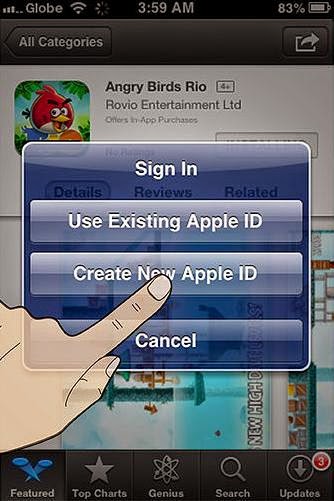
5.You then must tap on install button to install the app on your device. When you do that a new window appears telling you to sign in or create a new Apple ID. Proceed with create new Apple ID, fill in the necessary details and then tap Done.
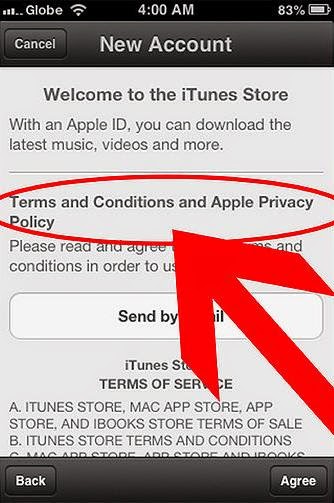
6.You’ll need to read the Terms and conditions of Apple App Store and click on Agree button located at the bottom of the page to proceed.
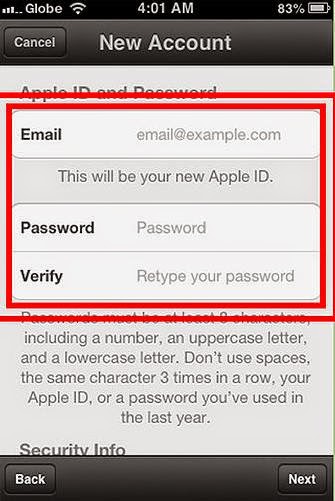
7.Next you need to enter your email address, birthday, answer security question, and create your password.
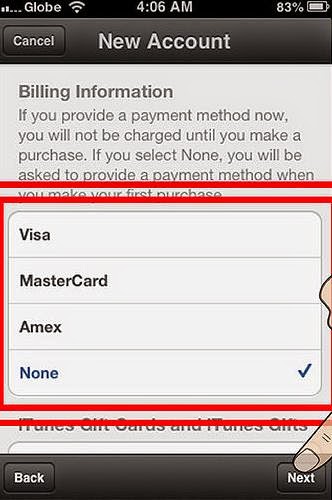
8.After that you need to select the mode of payment for paid apps and none for free apps and tap next.
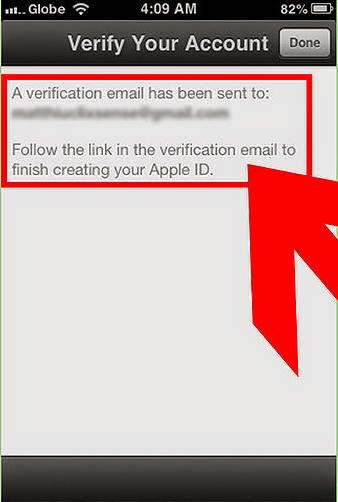
9.Now you will see a new window asking you to verify your account. You need to check your email to activate your account. And when you tap on the link you will automatically prompted to sign in with your account and password.
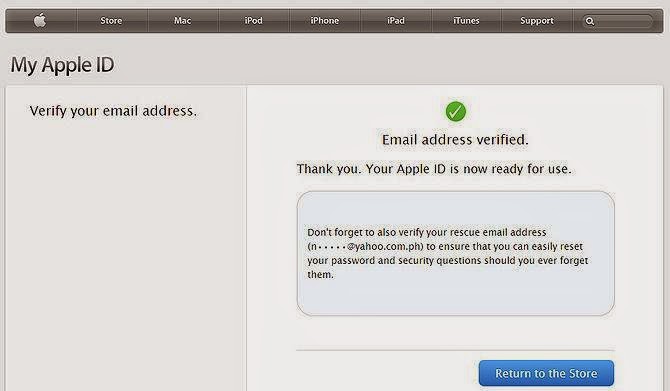
10.Once you do that, you have successfully created an Apple account and can now download the apps and enjoy iTunes, iBookstore and App store on your iPhone, iPad or iPod.
Available link for download
Saturday, May 27, 2017
How to Download Aadhaar Card with Aadhaar Number without Aadhaar Enrollment ID
How to Download Aadhaar Card with Aadhaar Number without Aadhaar Enrollment ID
As we already know to get Aadhaar Card people have gone across various problems and after than only they were successful in getting enrolled for their Aadhaar Card, so suppose if you have lost your Aadhaar Card or Aadhaar Card Enrollment Slip at this situation what you will do.

Will you re-enroll yourself for new Aadhaar Card or you will go to Aadhaar Card Office to ask them duplicate copy of your Aadhaar Card, re-enrolling yourself for New Aadhaar Card will be a wrong step as you were already enrolled the new enrollment of Aadhaar Card will directly get rejected due to previous data present.
So in this situation you can get your duplicate copy of your Aadhaar Card through Online Official Aadhaar Portal but you will need your Aadhaar Card Number to download your copy of Aadhaar Card from Online Aadhaar Portal, this will be efficient to you as there is no need to go to office of Aadhaar Card and wait in line to ask them about duplicate copy of your Aadhaar Card. If before anywhere you have note your Aadhaar Card Number or if you have photocopy of your Aadhaar Card you can check out the number of your Aadhaar Card and go to Online Portal of Aadhaar Card and download the copy of your Aadhaar Card, below steps will show you how to download Aadhaar Card with Aadhaar Card Number without Aadhaar Enrollment ID.
Go to https://eaadhaar.uidai.gov.in/
The site will show you a form “Step 1: Your Personal Details”
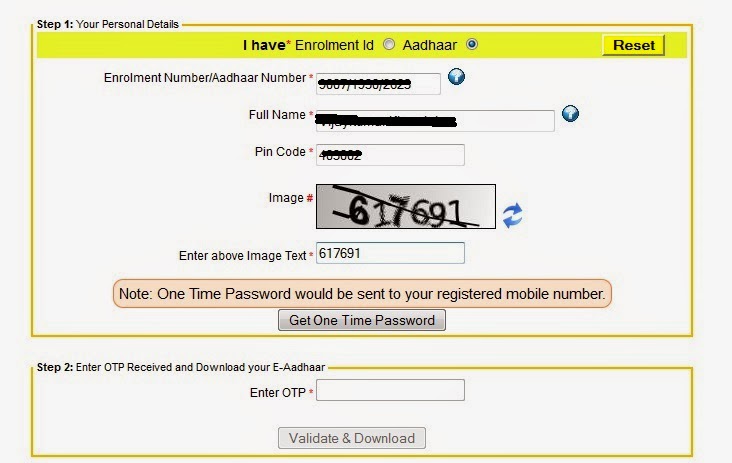
Click on I have Aadhaar from option I have Enrolment Id or Aadhaar
Enter your Aadhaar Number in the Aadhaar Number text box
Next enter Full Name as you had given while enrolling for Aadhaar Card
Enter Pin Code
Enter the Captcha which is appearing the image in the below textbox
And then click on Get One Time Password
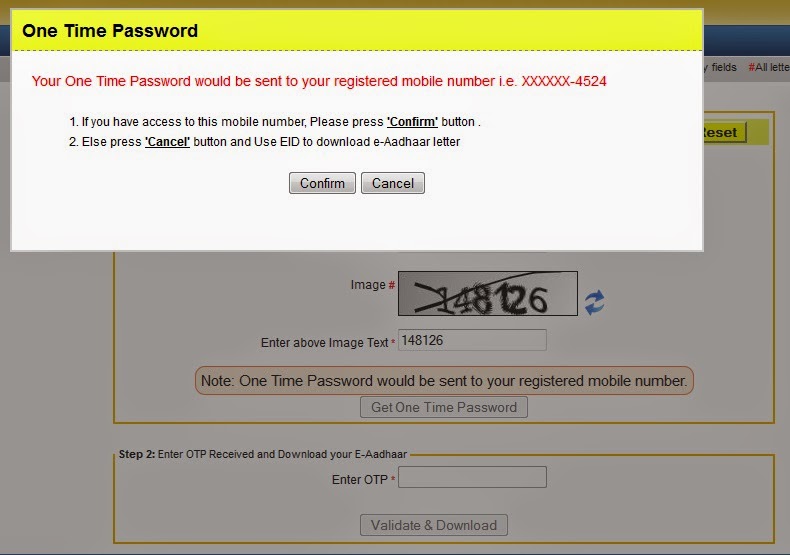
You will receive the OTP One Time Password on your registered mobile number which you had given while enrolling for Aadhaar Card
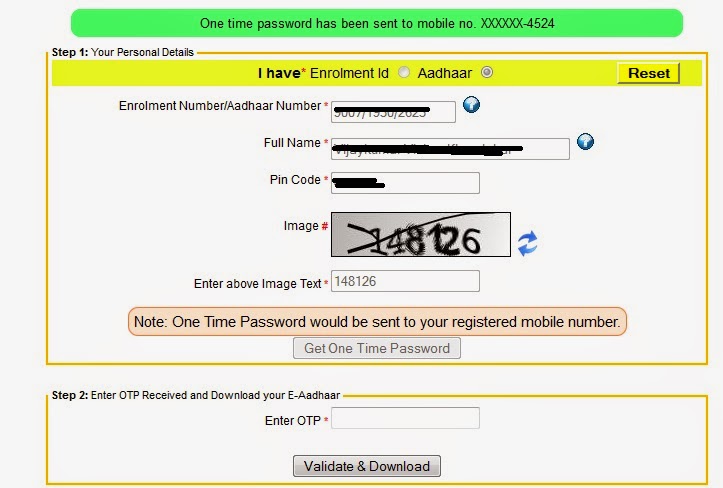
Enter the OTP One Time Password in the textbox below and click on Validate and Download
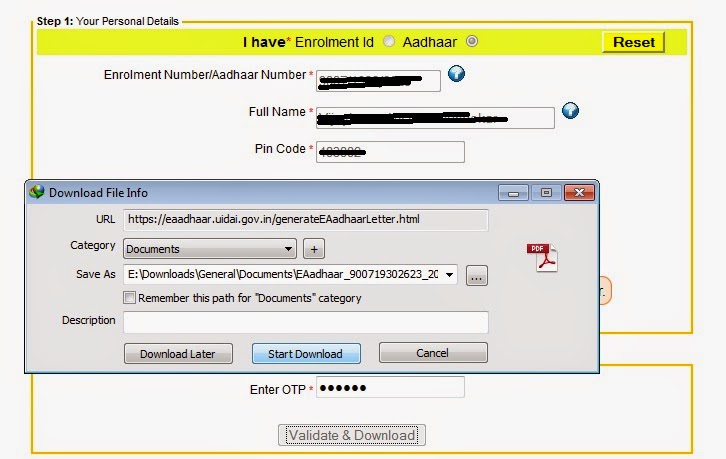
Your Aadhaar Card will get downloaded on your computer
To open the Aadhaar PDF File you will have to enter the password which you can get to know from Aadhaar Card PDF Password.
Also Read: Find Aadhaar Card Number by Name and Date of Birth
Will you re-enroll yourself for new Aadhaar Card or you will go to Aadhaar Card Office to ask them duplicate copy of your Aadhaar Card, re-enrolling yourself for New Aadhaar Card will be a wrong step as you were already enrolled the new enrollment of Aadhaar Card will directly get rejected due to previous data present.
So in this situation you can get your duplicate copy of your Aadhaar Card through Online Official Aadhaar Portal but you will need your Aadhaar Card Number to download your copy of Aadhaar Card from Online Aadhaar Portal, this will be efficient to you as there is no need to go to office of Aadhaar Card and wait in line to ask them about duplicate copy of your Aadhaar Card. If before anywhere you have note your Aadhaar Card Number or if you have photocopy of your Aadhaar Card you can check out the number of your Aadhaar Card and go to Online Portal of Aadhaar Card and download the copy of your Aadhaar Card, below steps will show you how to download Aadhaar Card with Aadhaar Card Number without Aadhaar Enrollment ID.
Go to https://eaadhaar.uidai.gov.in/
The site will show you a form “Step 1: Your Personal Details”
Click on I have Aadhaar from option I have Enrolment Id or Aadhaar
Enter your Aadhaar Number in the Aadhaar Number text box
Next enter Full Name as you had given while enrolling for Aadhaar Card
Enter Pin Code
Enter the Captcha which is appearing the image in the below textbox
And then click on Get One Time Password
You will receive the OTP One Time Password on your registered mobile number which you had given while enrolling for Aadhaar Card
Enter the OTP One Time Password in the textbox below and click on Validate and Download
Your Aadhaar Card will get downloaded on your computer
To open the Aadhaar PDF File you will have to enter the password which you can get to know from Aadhaar Card PDF Password.
Also Read: Find Aadhaar Card Number by Name and Date of Birth
Available link for download
Tuesday, May 23, 2017
How to Link Aadhaar Card UID to Voter ID EPIC Card Seeding Online
How to Link Aadhaar Card UID to Voter ID EPIC Card Seeding Online
How to Link Aadhaar Seeding with Voter Card | How to Link Aadhaar Card UID to Voter ID- EPIC Card Seeding Online
The Election Commission of in India link Voter ID Card EPIC ID with Aadhaar Card UID Seeding to weed out the fraudulent Voter Card holders from the existing Electors data. Now Candidates can link Aadhaar number with the electoral rolls by any one option of the following.
Aadhaar Seeding : How to Link Your Voter Card IEPIC ID with Aadhar card UID?
 01. Online Linking (through Official Web site)
02. Mobile Linking (Via Andrid (or) IOS mobile application).
03. Linking by sending an SMS.
04. Linking via Call Center.
01. Link to aadhaar card to Voter ID Via Online Linking OTP with Official Website
Candidates can link the Voter Card number with AADHAAR number using the online portal of Election Commission via the OTP (onetime password) the given mobile number by entering EPIC ID, UID, Mobile Number.
I. Log On to Official Website of the Chief electoral Officer - official link
II. First Enter Your EPIC ID ( Voter ID Number)
III. Enter Your UID (Aadhar Card 16 digits Number)
IV. Enter Your Mobile Number for receiving OTP (one time password).

finally Click On " VALIDATE" Button
V. And Candidates Now Compare Your UID and EPIC card information, Total Details yours and click on the "SEED" Button

VI. Now done Your voter Card link with Aadhar

This Option Now Available Some States, Other States will be available soon.
02. Mobile Linking Via Mobile applications :
Voters link using mobile app available in app store of Android App, (OR) IOS and Windows APP
The Election Commission of in India link Voter ID Card EPIC ID with Aadhaar Card UID Seeding to weed out the fraudulent Voter Card holders from the existing Electors data. Now Candidates can link Aadhaar number with the electoral rolls by any one option of the following.
Aadhaar Seeding : How to Link Your Voter Card IEPIC ID with Aadhar card UID?
02. Mobile Linking (Via Andrid (or) IOS mobile application).
03. Linking by sending an SMS.
04. Linking via Call Center.
01. Link to aadhaar card to Voter ID Via Online Linking OTP with Official Website
Candidates can link the Voter Card number with AADHAAR number using the online portal of Election Commission via the OTP (onetime password) the given mobile number by entering EPIC ID, UID, Mobile Number.
I. Log On to Official Website of the Chief electoral Officer - official link
II. First Enter Your EPIC ID ( Voter ID Number)
III. Enter Your UID (Aadhar Card 16 digits Number)
IV. Enter Your Mobile Number for receiving OTP (one time password).
finally Click On " VALIDATE" Button
V. And Candidates Now Compare Your UID and EPIC card information, Total Details yours and click on the "SEED" Button
VI. Now done Your voter Card link with Aadhar
This Option Now Available Some States, Other States will be available soon.
02. Mobile Linking Via Mobile applications :
Voters link using mobile app available in app store of Android App, (OR) IOS and Windows APP
03. Linking by Sending a SMS:
Link by Sending the Aadhar Card Number and Voter Card number SMS to 08790499899 in the following format.
SEEDEPIC (Space) (EPIC No) (Space) (Aadhaar No)04. Linking via Call Center:
Ex: SEEDEPIC XYZ1234567 1234 5678 9810 1112
Linking via Call Center by Calling to call center 1950 between 10 AM to 5 PM and furnishing the epic number and aadhar number to the call center operator.
Available link for download
Monday, May 1, 2017
How to Link Aadhaar Card with Voter ID EPIC
How to Link Aadhaar Card with Voter ID EPIC
Linking Aadhaar Card with Voter ID or EPIC process have been started by the Election Commission of India to eliminate bogus or fake Voter ID (EPIC). The process to link Aadhaar Card with EPIC or Voter ID is known as EPIC Aadhaar Seeding.
And if you are looking around for the solution or steps to Link your Aadhaar Number with Voters ID or EPIC you can get the complete info on How to Link Aadhaar Card with Voter ID (EPIC Card) from below guide.
Learn How to Link Aadhaar Card with Voter ID (EPIC)
Below steps will educate you how to link Aadhaar Card with Voter ID (EPIC) with different methods.
Link Aadhaar Card with Voter ID (EPIC) Online
This method to Link Aadhaar Card with Voter ID (EPIC) online is very easy as it can be easily completed in few seconds, you will just need following things available with you.


Link Aadhaar Card with Voter ID (EPIC) through SMS
You can even complete the step to link Aadhaar Number with EPIC ID or Voter ID just by sending SMS from your phone.
Link Aadhaar Card with Voter ID (EPIC) by calling
Also Read: How to Download Aadhaar Card Using Name
And if you are looking around for the solution or steps to Link your Aadhaar Number with Voters ID or EPIC you can get the complete info on How to Link Aadhaar Card with Voter ID (EPIC Card) from below guide.
Learn How to Link Aadhaar Card with Voter ID (EPIC)
Below steps will educate you how to link Aadhaar Card with Voter ID (EPIC) with different methods.
Link Aadhaar Card with Voter ID (EPIC) Online
This method to Link Aadhaar Card with Voter ID (EPIC) online is very easy as it can be easily completed in few seconds, you will just need following things available with you.
- Voter ID or EPIC Card
- Aadhaar Number (UID) and
- Mobile (on which you will receive the One Time Password AKA OTP)
- Just visit the official Linking Aadhaar Card with Voter ID (EPIC ID) site by clicking here.
- Once you are there on the Aadhaar Linking page, you will have to fill valid details asked in the form. From the two given options you can either select Search by details or Search by EPIC No.
- By any of these option search your EPIC or Voter ID listing and once you find the result or your voter id (EPIC) details from the result click on Feed Aadhaar No.
- On clicking Feed Aadhaar No. a small window form will popped out asking to enter the Name as it appears in our Aadhaar Card, Aadhaar Number, Mobile Number, select the mobile ownership type whichever applicable from the list and enter your email id and click on submit to link your Aadhaar Card Number with Voter ID or EPIC ID.
- Once you click on submit a message will appear saying “Your request for Aadhaar Number with Electoral Database has been successfully registered”.
Link Aadhaar Card with Voter ID (EPIC) through SMS
You can even complete the step to link Aadhaar Number with EPIC ID or Voter ID just by sending SMS from your phone.
- To Link Aadhaar Card with Voter ID (EPIC) just type ECILINK <EPIC_Number> <Aadhaar_Number> and send it to 166 OR 51969
Link Aadhaar Card with Voter ID (EPIC) by calling
- Linking Aadhaar Card with EPIC Card or Voter ID can also be done by simply calling 1950 between 10:00 AM to 5:00 PM and provide them your Aadhaar Number and Voter ID details to complete the process to link Aadhaar Card with Voter ID or EPIC ID.
Also Read: How to Download Aadhaar Card Using Name
Available link for download
Sunday, April 9, 2017
How to Download E Aadhaar by Name and Email id
How to Download E Aadhaar by Name and Email id

- First you have to find EID of your Aadhaar. To Find EID Click Here
- New Tab Open and shown as?
- Enter your name , Email id and security code.
- Click on Get OTP.
- Now enter OTP You Received on Email id and Click on “Verify OTP”
- After it you will get a SMS in Email id with your Enrollment ID.
After getting Enrolment id (EID) Follewthese Steps
- Go To UIDAI website At https://eaadhaar.uidai.gov.in/
- If you have Enrolment Number than you click Enrolment id Radio Button.
- Now enter your Enrolment id with Date & time.
- In Next Box Enter your Name shown on acknowledge Slip.
- Enter Security Code (Image Code) And your aria pin code .
- Enter Mobile No. to receive O.T.P.
- After Filling all information Click on Get One Time Password .
- Enter O.T.P. Received on Mobile And click Validate & Download
- Now your E Aadhaar downloaded into your computer . Open it in Adobe Reader.
Click Here To Download E Aadhaar
Available link for download
Thursday, April 6, 2017
How To Register Email Id in Aadhaar Online
How To Register Email Id in Aadhaar Online
If your Email id is registered in Aadhaar , you can find your Aadhaar without any information.You can also find your lost Aadhaar card by Name and Email id .If your mobile number and e-mail address are registered in Aadhaar . This will help you to avail various services in future.
If you want to register email id in Aadhaar online. you can easily register your email id in Aadhaar.
Just follow these steps.
1.- First go to the official website of UIDAI. Click Here
2.- Click on Update Aadhaar Data
3.- A new page will be open . There are two way to register email id in Aadhaar. (i) Online via Self Update Portal (ii) Send Update request via Post.
4.- Here we are using Online Method.
5.- Click On Update Aadhaar Data.
6.- New window will be open . Click On Submit update/ correction request online.
7.- Now Aadhaar Self Service Portal Will be Open.
8.- Enter Your Aadhaar Number and security code.

9.- Click On Send OTP.
10.- You will receive One Time Password (OTP) on your register mobile number. If Your Mobile is Not register in Aadhaar Click here.
11.- Enter One Time Password(OTP) and click on Login .
12.- Choose which you want to Update . To register email id Click on Email ids Check box and click Submit.

13.- Enter Your Email Address and Click On Submit Update Request. Next click Proceed Button.

14.-After click on Proceed Button your Update request will be submitted and you will received URN (Update Request Number ) on your mobile.
If you want to register email id in Aadhaar online. you can easily register your email id in Aadhaar.
Just follow these steps.
1.- First go to the official website of UIDAI. Click Here
2.- Click on Update Aadhaar Data
3.- A new page will be open . There are two way to register email id in Aadhaar. (i) Online via Self Update Portal (ii) Send Update request via Post.
4.- Here we are using Online Method.
5.- Click On Update Aadhaar Data.
6.- New window will be open . Click On Submit update/ correction request online.
7.- Now Aadhaar Self Service Portal Will be Open.
8.- Enter Your Aadhaar Number and security code.
9.- Click On Send OTP.
10.- You will receive One Time Password (OTP) on your register mobile number. If Your Mobile is Not register in Aadhaar Click here.
11.- Enter One Time Password(OTP) and click on Login .
12.- Choose which you want to Update . To register email id Click on Email ids Check box and click Submit.
13.- Enter Your Email Address and Click On Submit Update Request. Next click Proceed Button.
14.-After click on Proceed Button your Update request will be submitted and you will received URN (Update Request Number ) on your mobile.
Available link for download
Monday, April 3, 2017
Get Aadhar on E mail id
Get Aadhar on E mail id
?Steps to get e-Aadhaar in email:
1. If you have earlier checked your Aadhaar status and your Aadhaar is generated, follow the steps provided else first check your aadhaar status" If you dont know your aadhaar number, then follow these steps" :
Type UID EAADHAAR < 14 digit enrolment number> < email Id > < PIN code > on your mobile and send it to 51969.
"SAMPLE MESSAGE => UID EAADHAAR 12345678910123 abc@xyz.com 123456 and send to 51969"
If you know your Aadhaar number, then:
Type UID EAADHAAR < 12 digit Aadhaar number> < email Id > < PIN code > on your mobile and send it to 51969.
After above process-
You will receive the Aadhaar in your email id.
Once e-aadhaar downloaded, open it woth Adobe Acrobat Reader.
It will ask for password. The password for e-Aadhaar card is the pincode of your area.
Available link for download
Sunday, April 2, 2017
Facebook Par Fake Id Ka Pata Kaise Kare
Facebook Par Fake Id Ka Pata Kaise Kare
Facebook Par Fake Id Ka Pata Kaise Kare
Aaj duniya me sabse badi social media facebook hai aur agar aap bhi facebook par hai to ye post aapke liye hi hai mai Yaha par facebook fake account ke bare me batane wala hu jiski madad se aap kisi ke bhi facebook fake id ko pehchan jayege kyoki aaj jyada tar log facebook par apna fake id bana kar logo ke sath majak ya black mail bhi kar rahe hai agar aapko bhi koi facebook par paresan karta hai to mai aapko bata deta hu ki facebook par fake id ka pata kaise lagaye aur aaj facebook par jyadatar log girls naam se fake account id bana kar logo ko murkh bana rahe hai Aur aapne kisi ke facebook account par ye bhi dikhae deta hai ki uske profile par bahut sare likes hai aur wo bhi log facebook par fake account ki wajah se hi hota hai

Fake Account Id Ka Pata Kaise Lagaye Facebook Par
See Facebook Profile Pic: sabse pehle hum kisi ke id ke fake id ko pehchanne ke liye hame uske profile pic ko dekhna chahiye agar uska profile pic ek hi hai ya kisi se copy kiya ho ya kisi actress ka photo laga hai to fake id hone ke chanse ho sakte hai
Facebook Timeline: Dosto dusri bat aapko ye dhyan rakha hai facebook fake id pata lagane ke liye uska timeline check kare aapko uske comments ya status ko check agar uske photos par jyadatar bekar ke comments ya status ho aur agar wo jyada din par facebook fake id ko login karta hai to ye bhi fake id hone ka chanse deta hai
Check Profile Information : uske bad aapko uske facebook profile ke information ko check karna hai agar wo apna puri detail nahi diya hai to wo bhi fake id hone ka chance ho sakta hai aap atche se check kare
Facebook Profile URL : Dosto Yaha par aap dhyan de har kisi ke facebook id ka ek user name hota hai agar aap uski user name check karna Chahte hai to aap sirf ek bar hi check kar sakte hai jaise facebook.com/Ashutoshsingh agar uska user name par ladki ka naam hai to wo fake id hona ka jyada chanse hai
Check Facebook Profile Mobile No. mai Yaha par clear hi bata deta hu ki koi bhi ladki ke naam se facebook id bnane wale apna number facebook par publish nahi karenge agar usne bhi apna number publish nahi kiya hai to fake id hone ka chanse ho sakta hai
Recent Post Check: sabsi badi bat aapko uski fake id pehchan karne ke liye uska recent post bhi check karna chahiye agar uske recent post par bahut sare friend uske friend request accept karne par thanks ya bahut tarah ki bate bolte hai aur waise me agar wo id wala in sare friend ko reply nahi diya hai to bhi fake id hone ka hi chance hai
Photos Check Kare: Dosto aapko ye to malum hi hoga ki fake account id par jyadatar copyright image hi use kiya jata hai aap uski timeline Dekhe agar uske timeline me jyada google ke copyright image ko use kiya hai to wo bhi jyada chance hai fake id hone ka
Note: Agar phir bhi aapko uske fake id hone ka pata nahi lagta hai to mai aapse bolna chahta hu ki aap uski image ko google par check kare agar uska photo google par mil jata hai to wo fake id hone ka jyada chanse hai
Ye Post Bhi Padhe:
Computer ki jankari lene ke liye yaha click kare
mobile ki jankari ke liye yaha click kare
Mobile me free recharge pane ke liye yaha click kare
to dosto ye post aapko kaisa laga aap comment me jarur bataye aur aap chahe to is post ko share karke mera help kar sakte hai aap mere facebook page ko jarur like kare
Available link for download
Thursday, March 30, 2017
Apply Voter id online at emitra gov in
Apply Voter id online at emitra gov in
CEO Rajasthan Voter Id Card Apply Online emitra.gov.in New Voter Id , Correction , Duplicate guideline
Having a VOTER ID card is very essential for every Rajasthann Citizen. One has to 18 or above in order to apply for a Voters Id card. The voter ID card is one of the crucial document one must have. It is important for various legal documentation in varied government offices, but is primarily used as a ticket to vote. All the Candidates are informed those not registered as a voter may apply online for VOTER IDENTITY CARD FOR Rajasthan voter ID card status online registration allication form ceorajasthan.nic.in. The Voter Identity card is must for showing identity & For Votes. In this list Chief Electoral Officer CEO Rajasthan Election Commission of Rajasthan made the department also with a new technology. CEO Dept is providing facilities to make the voter ID card online. The Rajasthan govt. and NIC team of state is providing all the facilities of electoral roll online for which you need to use offical website of CEO http://nvsp.in/, www.ceorajasthan.nic.in. www.ceorajasthan.nic.in and www.rajsec.rajasthan.gov.in are the official website of Rajasthan Chief Electoral Officer (CEO).
.
The process of applying for voter ID card is simplified that makes very convenient and time saving for those who are registering for first time. Given below are some points that explains the benefits of online registration and shows why everyone must opt for online registration process instead of offline procedure that takes lot of time.
First of all it completely eradicate the need of standing in long queues at regina election commission offices for your registration and given online registration is much simplified it get rids of several time wasting steps that are unnecessary.
How to apply Voter ID Online
Applying Online is a very simple process. All you have to do is go to the Election Commission of Rajasthan (ECI) homepage, the official website for voter registration. The website has everything you would need to know about the election process in Rajasthan, from electoral rolls to the election schedules for upcoming elections across the country. It also has a list of guidelines for voters and various application forms to register oneself. There are a number of forms, based on the service you wish to avail. These range from name change, inclusion of name in electoral roll for citizens residing in Rajasthan, as well as separate forms for those who live overseas and members of the armed forces, those in government service, etc.
You would have to select the form for new voter registration, which is Form 6. Apply for voter id card online :
Normally within next few days, an election commission representative will visit your home to verify your address and details submitted at the time of registration. After that you will receive your voter ID card at your home. In normal circumstances you won’t need to visit the ECI office, but in cases where someone objects your claim of becoming a voter, you may be called at the office of electoral officer.
--------------------------------------------------------------------------------------
- Documents Required for Voter Registration in Rajasthan
- Check CEO Rajasthan Voter ID Card Application Status
- Check your name in Rajasthan Electoral Roll / Voter List Rajasthan
- Correction of Voter ID Details
- CEO Rajasthan Duplicate Voter ID Card Application
- What to if Someone Else Voted in your name & What is a Service Voter?
- Can and NRI Voter Register in Rajasthan
- Get CEO Rajasthan BLO Info, E-Mitra and Contact Information
Available link for download
Tuesday, March 28, 2017
Application for a Voter ID in Rajasthan for an NRI
Application for a Voter ID in Rajasthan for an NRI
?The steps to apply for a Voter ID Card in Rajasthan if you are an NRI
- Go the the CEO Rajasthan website, http://www.ceorajasthan.nic.in/index.aspx
- Find ‘Elector’s forms’ on the homepage and click on ‘Apply Online’ for online submission. You will need to create a username and password if you are a new user. Once you are logged in, you can click on form 6A and apply.
- Along with filing all your details like name, age, sex, visa particulars etc, you will have to attach some documents to certify these elements. These include soft copies of your passport, age proof, Indian address proof (It must be mentioned in your passport as well), foreign address proof and a passport size photograph. All documents must be self-attested.
- The application should be submitted directly to the Electoral Registration Officer (ERO) of the constituency within which the place of your ordinary residence as given in the valid passport falls. The Application in Form 6A can be presented in person to the ERO or sent by post addressed to the ERO concerned.
Available link for download
Saturday, March 25, 2017
How to Find Lost Enrolment Id Online
How to Find Lost Enrolment Id Online
If you Lost your Acknowledge Slip, you can get it from UIDAI website. To Find Enrolment id Online the process is given below-
Note- Your registered Mobile Number / Email which you provided at the time of enrolment is mandatory to receive lost UID / EID.
- Go to UIDAI website at https://resident.uidai.net.in/
- Left side of the page Click On FIND UID/EID
- Choose Enrolment No. from what you want to receive your lost .
- Enter full Name
- Enter Enter your Registered Mobile Number OR Email id to Receive OTP
- Enter security code and click on Get OTP.
- Shortly you receive One Time Password(OTP) On your mobile or Email id which you enter to receive.
- Enter it And click on VerifyOTP.
- If the entered OTP is Correct , you received EID (Enrolment id) On Your Mobile or Email id.
Note- Your registered Mobile Number / Email which you provided at the time of enrolment is mandatory to receive lost UID / EID.
Available link for download
Wednesday, March 8, 2017
Link Aadhar card ID to Voter Id online
Link Aadhar card ID to Voter Id online

?This project has been started under the name National Electoral Roll Purification and Authentication program (NERPAP). In recent decade, the issue of fake voters is on rise. This drive is supposed to help election commission for making the election process error-free. Link AADHAR cards to Voter id will help in linking voter ids with biometrics of the respective persons. Thus it will eventually lower down the probability of fake identities in elections.
?Seeding of Aadhar with Voter ID Card (EPIC) can be done through either of the following ways:
- Online
- via SMS or
- through Call Center.
?Link Aadhar card ID to Voter Id online:
- Click on the following link: http://electoralsearch.in
- This is a link to the National voters’ service portal.
- Enter the details as per what is asked in the respective fields.
- Select search.
- If your record is available, it will reflect your EPIC number/ Voter id number.
- Along with that the option of feeding AADHAR card number is found there.
- Click on that option. A pop-up window will appear.
- Enter the details in the fields. The EPIC number will already be there. You must fill AADHAR card number, mobile number and email id before hitting submit.
- After pressing Submit, a pop- up message will appear suggesting successful registration.
- Below is the screenshot of the epic ID seeding with aadhar card
??NOTE: Citizens from the State of Telangana need to register using this website – http://164.100.132.184/epic/
?Link Aadhar card ID to Voter Id by SMS:
- ECILINK<Space>EPIC_Number<Space>Aadhar NumberSend this sms on 51969 or 166. SMS charges will apply.
- For Example for EPIC id ABC1234567 and Aadhar no 123412341234, SMS is to be sent as – ECILINK ABC1234567 123412341234 to 51696 or 166
- On successfully registering via SMS a confirmation SMS shall be received.
?Link Aadhar card ID to Voter Id by Calling:
- In order to register for seeding of Aadhar and Voter ID Card (EPIC) over call one needs to call the dedicated call center mandated for the purpose of Aadhar-EPIC seeding.
- Before calling the call center one needs to be ready with his/her EPIC no and Aadhar ID.
- Call center can be reached by dialing toll free number 1950 from Mobile or Landline during office hours ie 10:00 AM – 5:00 PM on all working days.
- The call center executive needs to be provided with details like EPIC number, Aadhar ID, mobile no or email id etc.
Available link for download
Subscribe to:
Posts (Atom)