Showing posts with label find. Show all posts

Monday, June 19, 2017

How to Find Lost UIDAI Aadhaar or Enrollment Number

How to Find Lost UIDAI Aadhaar or Enrollment Number


?Find UID or EID by Name:

Step1:?
First of all you can go on the official website to find your lost aadhar card number and enrollment slip number. Official website of Unique Identification Authority of India Government of India is https://resident.uidai.net.in” to Find Uid/Eid.
                                    (OR)
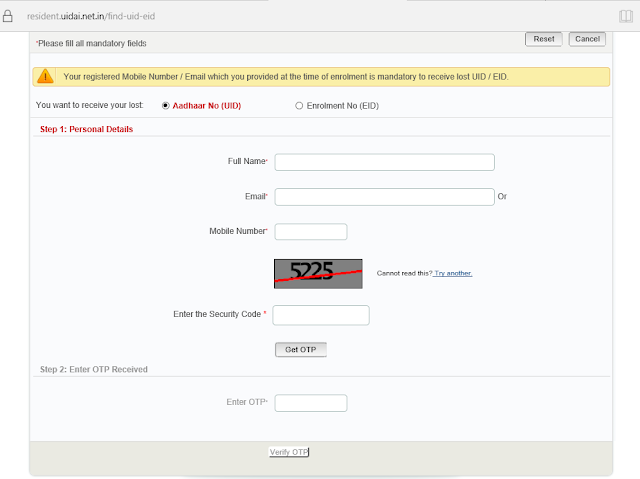
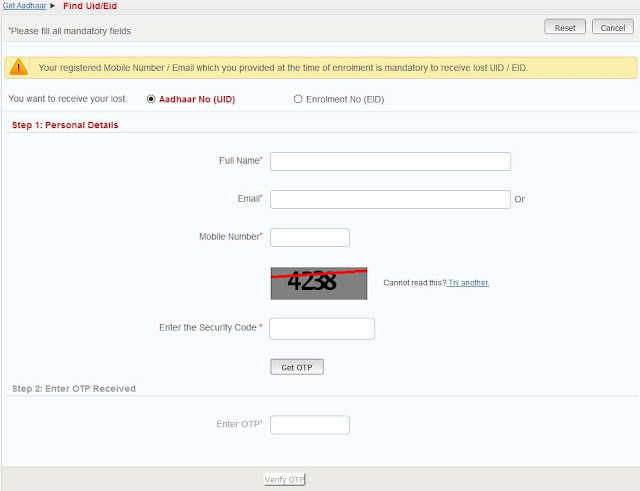
Click on the link https://resident.uidai.net.in/web/resident/find-uid-eid and you will reach to a new page and the form looks like give in below image.

"Note:-You must have to carry your registered mobile number which you have used at time of enrollment of Aadhar Card."

Step2:?
There are two option Aadhaar No (UID) to find aadhar number and Enrolment No (EID) number. Select the Aadhar Number option or UID Option.


Step3:?
Now enter your Full Name, Email, Mobile Number and the Captcha or the Security text – Click Get OTP to receive OTP on your Mobile number

Step4:?
Enter the OTP once you receive it and Click on Verify OTP


https://resident.uidai.net.in/web/resident/find-uid-eid

______________________________________________________
You will now have received an Email on your registered email ID with your UID or EID number.


Available link for download

Read more »

Monday, May 22, 2017

Find Aadhaar Card Number by Name

Find Aadhaar Card Number by Name


Aadhaar Card Official Portal to check status of Aadhaar Card Generation process allows to track it with the help of Aadhaar Enrollment ID and if you don’t have that Enrollment ID you are not able to track the status of your Aadhaar Card Online so only option will be you will have to wait until your Aadhaar Card gets delivered at your postal Address. 

Find Aadhaar Card Number by Name

Checking Aadhaar Card status helps to know you whether your Aadhaar enrollment have been approved or rejected.

To help those all people and to make ease in the system the Aadhaar Officials will be soon launching Find Aadhaar Card Number by Name this feature will help easily to download Aadhaar Card, check Aadhaar Card Status by Name without any Aadhaar Enrollment ID or Aadhaar Card Number you will just have to enter your full name, postal code, mobile number and you are set to Find Aadhaar Card Number by Name.


Currently this feature Find Aadhaar Card Number by Name is still not implemented but it will be soon implemented in future to make some ease in Aadhaar Card. To know about release of this feature Find Aadhaar Card Number by Name stay connected with us, as soon as Find Aadhaar Card Number by Name feature gets available in the Official Aadhaar Card Portal we will post an update.


Update: You can now Search Aadhaar Number by Name.


Available link for download

Read more »

Wednesday, May 10, 2017

How to Find Aadhaar Number by Name

How to Find Aadhaar Number by Name


At last Aadhaar have come up with new feature in which any resident can find their Aadhaar Number by name, which was earlier not possible if the resident have lost his Aadhaar Enrollment Slip or Aadhaar Card. This was the most awaited feature which have been recently launched on Aadhaar Portal. 

Now if the individual have lost his Aadhaar Enrollment Slip or Aadhaar Card Number they can easily find their Aadhaar Number by name and can download a new duplicate copy of Aadhaar Card and use it for various purposes. So below steps will allow you to know How to Find Aadhaar Number by Name.

Learn How to Find Aadhaar Number by Name


  • Visit the official Aadhaar website which allows you to search your Aadhaar Number by name by clicking here.
How to Find Aadhaar Number by Name

  • Once you are there on the page Find Uid/Eid, select the appropriate option from the form “You want to receive your lost: Aadhaar No (UID) or Enrollment No (EID).
  • Once you select the applicable option from it just fill the below form which includes Full Name, email id or mobile number, solve the below captcha and hit on Get OTP button. Once you hit on get OTP button the One Time Password will get instantly delivered to your mobile number just enter the OTP which you received through SMS in the Enter OTP field provided in the form and click on verify OTP.
That’s it now you can download your Aadhaar Card and print a color copy of it to use and produce it for various purposes.

Also Read: How to Download Aadhaar Card Copy

Available link for download

Read more »

Monday, May 8, 2017

How to voters can find contact details of BLO ERO

How to voters can find contact details of BLO ERO


? There are two ways by which you can obtain the contact        details of your polling station officers:
  • Online
  1. Go to CEO RAJ website, http://www.ceorajasthan.nic.in/index.aspx
  2. Find and click on ‘Know your BLO/ERO’ on the right hand bar.
  3. You will be redirected to a new page, http://eci-citizenservicesforofficers.nic.in/officerscontact/
  4. Fill in the necessary details and click ‘Get contact details of officers’ to find the contact number and address of your BLO and ERO.
All 200 EROs of Rajasthan can be viewed together as well along with their details like AC name, district, mobile number and telephone number by following these steps:
  • Visit the state CEO site, http://www.ceorajasthan.nic.in/index.aspx
  • Click on the ‘List of EROs with detail’ on the right hand bar.
  • You will be redirected to a new page, http://164.100.153.10/electoralroll/ERODetail.aspx
  • SMS
  1. You can find the contact details of your BLO and ERO by simply sending a text message to 9680999899.
  2. Type ‘VOTERJ M’ <space> ‘10 digit Voter ID Card No’.
  3. You will receive a reply with your AC number, AC name, ERO name, ERO mobile number, Polling station name and part number, BLO name and BLO contact number.

Available link for download

Read more »

Wednesday, May 3, 2017

Find UID EID By Name resident uidai net in

Find UID EID By Name resident uidai net in


How to Find Aadhar Number (UID) & Enrollment Number EID By resident.uidai.net.in-

In this article, we will discus about How to Find UID EID by Name through official website of Aadhaar Kiosk! - resident.uidai.net.in/. Full form of UID - Unique Identity & Full form of EID - Enrollment ID number. Official web portal of Unique Identification Authority of India is uidai.gov.in.

What is UID - 

UID is called Unique Identity Number or Aadhar card number. It is 12 digit unique number provided by Unique Identification Authority of India - UIDAI. Aadhar card number/ UID number printed on aadhar card letter.

Apply Now For New Aadhar Card
Get Your Aadhar Card
Online Application Form

What is EID -

EID is called Enrollment Id number. Enrolment ID (Enrolment Number) is a 28 digit numeric character. The format of EID is EA Code - 4 digit, Station Code - 5 digit, Sequence - 5 digit, YYYYMMDD - 8 digit and HH:MM:SS - 6 digit. The total number of all the above digits will be 28. EID number printed on Acknowledgement slip provided at time of aadhar card registration.

If you have lost your acknowledgement slip and aadhar card means if you have forgot your aadhar number and enrollment number, then you can find easily your aadhar card number and enrollment number by name.

We are going to tell that how to find UID - Aadhar Number by name and How to find EID - Enrollment Number by name. The simple step are given below. follow the step to find out your unique id and enrollment number by name.


Note - Your registered Mobile Number / Email which you provided at the time of enrolment is mandatory to receive lost UID / EID.

How to Find UID - Aadhar Number

To find UID by name then visit on the Aadhaar Kiosk! - resident.uidai.net.in/.
1. First of all go to the Aadhaar Kiosk! web portal.
2. Now to get uid number click on the text link "Find UID EID".
3. Now select the "Aadhaar No (UID)" to get uid number.
4. Now enter all your personal details in the form.

Enter your Full Name required
Enter your Email ID required
Enter your Mobile Number required
Enter image code required

5. Now click on the get otp.
OTP - one time password will be send on your mobile number.
6. Now enter otp in the required field and click on verify otp.

Now You will have received an Email on your registered email ID with your UID - Aadhar number.

How to Find EID - Enrollment Number

To Find EID by name visit on the official Website of Aadhaar Kiosk! - resident.uidai.net.in/.
1. Click on the "Find UID EID" in Aadhaar Kiosk! webpage.
2. Select the "Enrolment No (EID)" to get eid number.
3. Enter full name, mobile number, email id and image code.
4. Click on "GET OTP" button and fill.
5. Now click on varify otp.
Now You will have received an Email on your registered email ID with your EID - Enrollment number.

Important Links - 
Apply for Aadhaar Card
Download E-Aadhaar Card Online
Update Aadhaar Card Online
Check Status of Aadhaar Card Online


Thank you for visiting on www.iaadharuidai.blogspot.in. More information about to find eid & uid number please comment below.


Available link for download

Read more »

Tuesday, April 18, 2017

Find Lost UIDAI Aadhaar or Enrollment Number

Find Lost UIDAI Aadhaar or Enrollment Number


?Follow the below mentioned steps to get your lost Aadhar number or enrollment number. Below pasted image will help you to get the Aadhar number.

Step 1 ? – Visit Online Aadhar Card Kiosk on Resident UIDAI Portal:

Click on the link https://resident.uidai.net.in/web/resident/find-uid-eid and you will reach to a new page and the form looks like give in below image.
Click on the tab that says, ‘Find UID/EID’
You would be re-directed to the Aadhar Card UID/EID search page
Select whether you want to search for ‘UID’ or ‘EID’ for Aadhar card by name

Step 2 ?– Enter the Details to Generate and OTP:
Enter your personal details like Name, Mobile Number/Email ID (registered with your Aadhar card details). You would then receive a ‘One Time Pin’ on either your mobile number or the email id, depending upon the field you decide to enter. You would also have to fill in the security captcha code before you click on ‘Get OTP’.

Step 3 ?– Enter the OTP and Submit  – You will Find your UID / EID:
Enter the OTP you received as a text/email. Make sure that you have entered the correct OTP and if so is the case, click on ‘Verify OTP’.
If you have provided the correct details and followed the mentioned steps properly, you would soon receive your lost UID or EID and the Aadhar Card ID search by name would be completed.

Step 4 ?– Status Check for Aadhar Card by Name:
Once you receive your UID or EID, you can proceed with the Aadhar Card status check
on the Resident Portal itself (Requires the 28-digit Enrolment ID i.e. EID). Here are the 4 simple steps to do so:

  • On the homepage, just click, ‘Check Aadhar Status’.
  • Enter the 28-digit Aadhar Card Enrollment ID.
  • Enter the security captcha.
  • Click on ‘Get Status’.


Available link for download

Read more »

Saturday, April 15, 2017

How to Find Aadhaar Card UID or EID by Name

How to Find Aadhaar Card UID or EID by Name


Have you lost your Aadhaar Card Number or Aadhaar Enrolment Number? If yes than you can find Aadhaar Card Number (UID) or Aadhaar Enrolment Number (EID) by simply searching with name.

Below is the procedure to Search or Find Aadhaar Card UID or EID by Name.

Step by Step Guide on How to Find Aadhaar Card UID or EID by Name
  • To search Aadhaar Card Number or Aadhaar Enrollment Number by name just visit Find Uid/Eid page https://resident.uidai.net.in/find-uid-eid 
Find Aadhaar Card UID or EID by Name

    • Select you want to receive your lost Aadhaar Number (UID) or Aadhaar Enrolment Number (EID).
    • And enter the following details like Full Name, Email ID or Mobile Number, Enter the security code and click on get OTP.
    • Just enter the OTP received on your registered mobile number in below enter OTP field and click on verify button.
    • You will received your Aadhaar Enrolment Number (EID) or Aadhaar Number (UID) on your registered mobile number or email id.
    Once you get to know your Aadhaar Card Number or Aadhaar Enrolment Number you can do many more things like.
    1. Download your e-Aadhaar Card PDF Copy
    2. Check Aadhaar Card Status etc.

    Available link for download

    Read more »

    Saturday, April 1, 2017

    Where to Find Aadhaar Card PDF Password on Acknowledgement or Resident Copy

    Where to Find Aadhaar Card PDF Password on Acknowledgement or Resident Copy


    In our earlier article we have already mentioned that to open your Downloaded Aadhaar Card PDF Copy you will need password, and the password format which you should enter to open your e-Aadhaar PDF Copy will be your postal code of your residence address.


    Where to Find Aadhaar Card PDF Password on Acknowledgement or Resident Copy

    But some people usually don’t remember their postal code or postal code which they have mentioned while registering for Aadhaar Card. So to find out your postal code which you had given while you had registered for Aadhaar Card, you can easily find it by referring your Aadhaar Card Acknowledgment Copy or Aadhaar Resident Copy which you was provided once you had enrolled for Aadhaar Card.

    Just refer your Aadhaar Acknowledgement Slip or Resident Copy and find your postal pin code number. In the above image we have marked where your postal address pin code will be mentioned, just enter the same postal pin code as mentioned on your Aadhaar Acknowledgement Slip or Resident Copy to open your Aadhaar Card PDF File.

    Once you enter your postal pin code in password field your Aadhaar PDF File will open.


    Also Read: Can We Change Photo in Aadhaar Card Online

    Available link for download

    Read more »

    Saturday, March 25, 2017

    How to Find Lost Enrolment Id Online

    How to Find Lost Enrolment Id Online


    If you Lost your Acknowledge Slip, you can get it from UIDAI website. To Find Enrolment id Online the process is given below-
    • Go to UIDAI website at https://resident.uidai.net.in/ 
    • Left side of the page Click On FIND UID/EID 
    • Choose Enrolment No. from  what you want to receive your lost .
    • Enter full Name 
    • Enter Enter your Registered Mobile Number OR Email id to Receive OTP
    • Enter security code and click on Get OTP.
    • Shortly you receive One Time Password(OTP) On your mobile or Email id which you enter to receive.
    • Enter it And click on VerifyOTP.
    • If the entered OTP is Correct , you received EID (Enrolment id) On Your Mobile or Email id.

    Note- Your registered Mobile Number / Email which you provided at the time of enrolment is mandatory to receive lost UID / EID.

    Available link for download

    Read more »

    Friday, March 24, 2017

    Find Nearest Aadhar Card Center

    Find Nearest Aadhar Card Center


     Center


    An individual can enroll for Aadhaar by approaching one of the centre allocated by Unique Identification Authority of India (UIDAI)
    • To find a Enrolment Centre near to you, simply click on the link : http://appointments.uidai.gov.in/easearch.aspx
    • Select State
    • Then Select your District/City
    • And finally select your near by available Locality/Area
    • Press Search.
    After Clicking on the Search you wilt find your near by Aadhar Enrolment Centre Address, Aadhar Enrolment Centre Person to whom you can contact details, Enrolment Starting Date and Closing Date on that particular centre. See Picture
    Incoming Search Terms:
    • Aadhar Card Enrolment
    • Aadhar Card Enrollment Centers
    • Enrollment Centre For Aadhaar

    Available link for download

    Read more »

    Saturday, March 11, 2017

    How to Find All Keyboard Shortcuts in Your Computer

    How to Find All Keyboard Shortcuts in Your Computer


    How to Find All Keyboard Shortcuts in Your Computer


    Windows provide all the help you need. You have to only find this help. Most of the people cant use this instead they waste time on Internet.

    1.Goto START>All Programs>Accessories>System Tools>Character Map.


    2.Press F1 or click the Help button on the upper right of the window.

    • The HELP window will open.


    3.Type on the search box " Keyboard shortcuts".


    4.It will give you the result of the search and the first result is your "Keyboard Shortcuts".


    Available link for download

    Read more »

    Friday, March 10, 2017

    How to Find Who Unfriend you on Facebook

    How to Find Who Unfriend you on Facebook


    How to Find Out Someone Unfriend you in Facebook


    Generally, Facebook wont notify you when people unfriend or remove you from their friend list. Suppose you have 425 friends on Facebook yesterday but today number decreases to 421. How do you find the names of those four peoples who decided to unfriend you on Facebook. So a free web app which will notify you when someone unfriend or remove you from their friend list is a solution of this problem. Formy Browser can help you to reveal the names of your ex-friend. But the services offered by this site are not free, you can use that services for a short period only. So lets adopt another method.


    There is free Firefox Add-ons called Formy Browser which will help you to find the names of your ex-friends.

    Features Of Unfriend Finder:

    • Easily integrate with your Facebook account.
    • Create a separate icon in menu bar which shows how many friend unfriend you from their friends list.
    • You will get immediately notified when anyone unfriend you.
    • Find out who did not accept your friend request or who ignored your friend request.

      How to Install Unfriend Finder On Facebook:

      1. Unfriend Finder compatible only with Firefox, Chrome, Opera, Safari.
      2. Add the   Formy browser Add on Links provided below..
      3. Follow the instruction on the "download" page.
      4. Find your ex-friends and enjoy.
    You Can find the Chrome Browser Version Here,or Firefox version Here.

    Note: All downloading and installing steps are on the official page of this app. But if any one of you are unable to perform the task then comments are always open for that.

    Available link for download

    Read more »