Showing posts with label uid. Show all posts
Showing posts with label uid. Show all posts
Tuesday, May 23, 2017
How to Link Aadhaar Card UID to Voter ID EPIC Card Seeding Online
How to Link Aadhaar Card UID to Voter ID EPIC Card Seeding Online
How to Link Aadhaar Seeding with Voter Card | How to Link Aadhaar Card UID to Voter ID- EPIC Card Seeding Online
The Election Commission of in India link Voter ID Card EPIC ID with Aadhaar Card UID Seeding to weed out the fraudulent Voter Card holders from the existing Electors data. Now Candidates can link Aadhaar number with the electoral rolls by any one option of the following.
Aadhaar Seeding : How to Link Your Voter Card IEPIC ID with Aadhar card UID?
 01. Online Linking (through Official Web site)
02. Mobile Linking (Via Andrid (or) IOS mobile application).
03. Linking by sending an SMS.
04. Linking via Call Center.
01. Link to aadhaar card to Voter ID Via Online Linking OTP with Official Website
Candidates can link the Voter Card number with AADHAAR number using the online portal of Election Commission via the OTP (onetime password) the given mobile number by entering EPIC ID, UID, Mobile Number.
I. Log On to Official Website of the Chief electoral Officer - official link
II. First Enter Your EPIC ID ( Voter ID Number)
III. Enter Your UID (Aadhar Card 16 digits Number)
IV. Enter Your Mobile Number for receiving OTP (one time password).

finally Click On " VALIDATE" Button
V. And Candidates Now Compare Your UID and EPIC card information, Total Details yours and click on the "SEED" Button

VI. Now done Your voter Card link with Aadhar

This Option Now Available Some States, Other States will be available soon.
02. Mobile Linking Via Mobile applications :
Voters link using mobile app available in app store of Android App, (OR) IOS and Windows APP
The Election Commission of in India link Voter ID Card EPIC ID with Aadhaar Card UID Seeding to weed out the fraudulent Voter Card holders from the existing Electors data. Now Candidates can link Aadhaar number with the electoral rolls by any one option of the following.
Aadhaar Seeding : How to Link Your Voter Card IEPIC ID with Aadhar card UID?
02. Mobile Linking (Via Andrid (or) IOS mobile application).
03. Linking by sending an SMS.
04. Linking via Call Center.
01. Link to aadhaar card to Voter ID Via Online Linking OTP with Official Website
Candidates can link the Voter Card number with AADHAAR number using the online portal of Election Commission via the OTP (onetime password) the given mobile number by entering EPIC ID, UID, Mobile Number.
I. Log On to Official Website of the Chief electoral Officer - official link
II. First Enter Your EPIC ID ( Voter ID Number)
III. Enter Your UID (Aadhar Card 16 digits Number)
IV. Enter Your Mobile Number for receiving OTP (one time password).
finally Click On " VALIDATE" Button
V. And Candidates Now Compare Your UID and EPIC card information, Total Details yours and click on the "SEED" Button
VI. Now done Your voter Card link with Aadhar
This Option Now Available Some States, Other States will be available soon.
02. Mobile Linking Via Mobile applications :
Voters link using mobile app available in app store of Android App, (OR) IOS and Windows APP
03. Linking by Sending a SMS:
Link by Sending the Aadhar Card Number and Voter Card number SMS to 08790499899 in the following format.
SEEDEPIC (Space) (EPIC No) (Space) (Aadhaar No)04. Linking via Call Center:
Ex: SEEDEPIC XYZ1234567 1234 5678 9810 1112
Linking via Call Center by Calling to call center 1950 between 10 AM to 5 PM and furnishing the epic number and aadhar number to the call center operator.
Available link for download

Thursday, May 18, 2017
UID Card Registration
UID Card Registration
UID Card Registrations are now taking place throughout INDIA in all States and also the UID Aadhaar Card have made compulsory in all services.
Now we have to produce the UID Aadhaar Card for various services in INDIA.
Aadhaar Card now acts as an ID card for all Indian Residents, now all Residents of INDIA should have Aadhaar Card.
Government have opened Aadhaar Card Enrollment throughout INDIA in all States operating at various places.
Aadhaar Card have now become a New Identification Card without which you can proceed to any work.
Aadhaar Card is now asked for various purposes, Aadhaar card is Unique Identification Authority of INDIA.
Aadhaar Card Centers are operating in various places in all states in INDIA.
Also Read: Check Aadhaar Card Status by Mobile Number
Now we have to produce the UID Aadhaar Card for various services in INDIA.
Aadhaar Card now acts as an ID card for all Indian Residents, now all Residents of INDIA should have Aadhaar Card.
Government have opened Aadhaar Card Enrollment throughout INDIA in all States operating at various places.
Aadhaar Card have now become a New Identification Card without which you can proceed to any work.
Aadhaar Card is now asked for various purposes, Aadhaar card is Unique Identification Authority of INDIA.
Aadhaar Card Centers are operating in various places in all states in INDIA.
Also Read: Check Aadhaar Card Status by Mobile Number
Available link for download
Wednesday, May 3, 2017
Find UID EID By Name resident uidai net in
Find UID EID By Name resident uidai net in
How to Find Aadhar Number (UID) & Enrollment Number EID By resident.uidai.net.in-
In this article, we will discus about How to Find UID EID by Name through official website of Aadhaar Kiosk! - resident.uidai.net.in/. Full form of UID - Unique Identity & Full form of EID - Enrollment ID number. Official web portal of Unique Identification Authority of India is uidai.gov.in.What is UID -
UID is called Unique Identity Number or Aadhar card number. It is 12 digit unique number provided by Unique Identification Authority of India - UIDAI. Aadhar card number/ UID number printed on aadhar card letter.Apply Now For New Aadhar Card
Get Your Aadhar Card
Online Application Form
What is EID -
EID is called Enrollment Id number. Enrolment ID (Enrolment Number) is a 28 digit numeric character. The format of EID is EA Code - 4 digit, Station Code - 5 digit, Sequence - 5 digit, YYYYMMDD - 8 digit and HH:MM:SS - 6 digit. The total number of all the above digits will be 28. EID number printed on Acknowledgement slip provided at time of aadhar card registration.If you have lost your acknowledgement slip and aadhar card means if you have forgot your aadhar number and enrollment number, then you can find easily your aadhar card number and enrollment number by name.
We are going to tell that how to find UID - Aadhar Number by name and How to find EID - Enrollment Number by name. The simple step are given below. follow the step to find out your unique id and enrollment number by name.
Note - Your registered Mobile Number / Email which you provided at the time of enrolment is mandatory to receive lost UID / EID.
How to Find UID - Aadhar Number
To find UID by name then visit on the Aadhaar Kiosk! - resident.uidai.net.in/.1. First of all go to the Aadhaar Kiosk! web portal.
2. Now to get uid number click on the text link "Find UID EID".
3. Now select the "Aadhaar No (UID)" to get uid number.
4. Now enter all your personal details in the form.
Enter your Full Name required
Enter your Email ID required
Enter your Mobile Number required
Enter image code required
5. Now click on the get otp.
OTP - one time password will be send on your mobile number.
6. Now enter otp in the required field and click on verify otp.
Now You will have received an Email on your registered email ID with your UID - Aadhar number.
How to Find EID - Enrollment Number
To Find EID by name visit on the official Website of Aadhaar Kiosk! - resident.uidai.net.in/.1. Click on the "Find UID EID" in Aadhaar Kiosk! webpage.
2. Select the "Enrolment No (EID)" to get eid number.
3. Enter full name, mobile number, email id and image code.
4. Click on "GET OTP" button and fill.
5. Now click on varify otp.
Now You will have received an Email on your registered email ID with your EID - Enrollment number.
Important Links -
Apply for Aadhaar Card
Download E-Aadhaar Card Online
Update Aadhaar Card Online
Check Status of Aadhaar Card Online
Thank you for visiting on www.iaadharuidai.blogspot.in. More information about to find eid & uid number please comment below.
Available link for download
Tuesday, April 18, 2017
UID Aadhaar Card now to have DOB
UID Aadhaar Card now to have DOB
UID Aadhaar Card now will have Date of Birth mentioned in the Aadhaar Card, previously the Aadhaar Card used to have only the year of birth.
Addhaar Card where not mentioning the full Date of Birth in the format DD/MM/YYYY, it was to only mention the year of birth.
People where used to have problems with their Aadhaar Card because the full Date of Birth where not mentioned in the Aadhaar Card, but now on-wards all those people who have enrolled for Aadhaar Card in the month of May will be getting the Full date of Birth on their Aadhaar Card.
People who have enrolled for Aadhaar Card before May for them sad news they will get their Aadhaar Card in old format that is only the Year of Birth will be printed on their Aadhaar Card.
So Aadhaar Card now is developing towards success they are bringing new updates and changes to all those bugs which were causing trouble to the Residents and let’s wait there will be more updates and changes in Aadhaar Card soon.
There is an news leaked that Aadhaar Card will be issued for all residents of India in the form of Smart Card so that it will be reliable for the resident of India to maintain.
Aadhaar Card is just and Identification Proof and in Identity Card there should be Date of Birth mentioned in the Aadhaar Card, that was an biggest mistake in the Aadhaar Card now good that this issue is solved and Date of Birth of applicant is mentioned in full in the Aadhaar Card.
So now let’s wait for other further changes in Aadhaar Card, we will be updating all news about Aadhaar Card.
You may also like : How to Download Aadhaar Card Online?
Available link for download
Saturday, April 15, 2017
How to Find Aadhaar Card UID or EID by Name
How to Find Aadhaar Card UID or EID by Name
Have you lost your Aadhaar Card Number or Aadhaar Enrolment Number? If yes than you can find Aadhaar Card Number (UID) or Aadhaar Enrolment Number (EID) by simply searching with name.
Below is the procedure to Search or Find Aadhaar Card UID or EID by Name.
Step by Step Guide on How to Find Aadhaar Card UID or EID by Name
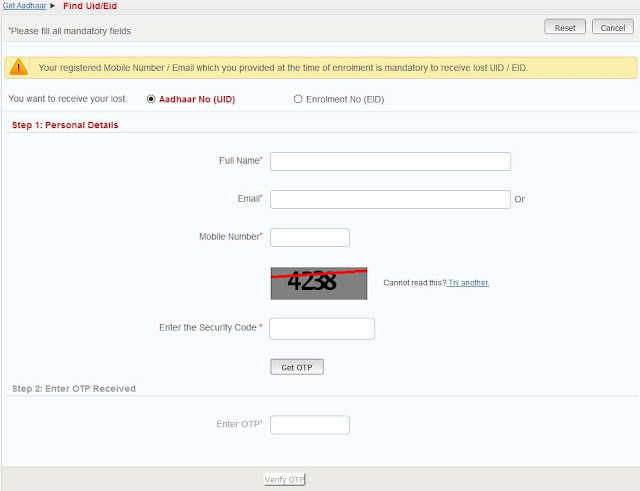
Below is the procedure to Search or Find Aadhaar Card UID or EID by Name.
Step by Step Guide on How to Find Aadhaar Card UID or EID by Name
- To search Aadhaar Card Number or Aadhaar Enrollment Number by name just visit Find Uid/Eid page https://resident.uidai.net.in/find-uid-eid
- Select you want to receive your lost Aadhaar Number (UID) or Aadhaar Enrolment Number (EID).
- And enter the following details like Full Name, Email ID or Mobile Number, Enter the security code and click on get OTP.
- Just enter the OTP received on your registered mobile number in below enter OTP field and click on verify button.
- You will received your Aadhaar Enrolment Number (EID) or Aadhaar Number (UID) on your registered mobile number or email id.
- Download your e-Aadhaar Card PDF Copy
- Check Aadhaar Card Status etc.
Available link for download
Sunday, March 5, 2017
How to Validate Digital Signature in E aadhar UID
How to Validate Digital Signature in E aadhar UID
How to Validate Digital Signature After Download on e-Aadhaar?Aspirants here a query was raising on How to Validate Digital Signature After Download on e-Aadhaar? Here is the simple solution. In case you see the ‘Validity unknown’ icon on your e-Aadhaar, please follow the below procedure: -
?You can open the website eaadhaar.uidai.gov.in. After entering in e-Aadhaar website you can see the Validate Option.

_______________________________________________________________________________
?In case you see the validity unknown icon on your e-Aadhaar, please follow the below procedure: -
1) Right click on the Validity unknown icon and click on Validate Signature.
2) You will get the signature validation status window, click on Signature Properties.
3) Click on Show Certificate..
4) Verify that there is a certification path named CCA India 2011. This identifies CCA India as the owner of the digital certificate that has been used when signing the document.
5) Mark the certification path named CCA India 2011, click the Trust tab and then Add to Trusted Identities.
6) Answer OK to any security question that follows.
7) Check(?) the field for Use this certificate as a trusted root and click OK twice to close this and the next window.
8) Click Validate Signature to execute the validation.
??Note: - Once CCA India 2011 has been as a Trusted Identity, any subsequent documents with digital signatures from CCA will be validated automatically when opened.
Available link for download
Subscribe to:
Posts (Atom)