Showing posts with label password. Show all posts
Showing posts with label password. Show all posts
Monday, June 26, 2017
Mobile Me Wifi Password Kaise Hack Kare
Mobile Me Wifi Password Kaise Hack Kare
Android Mobile Me Wifi Password Kaise Hack Kare
Hello dosto aaj mai aapko ye batane wala hu ki kisi
bhi wifi password kaise hack kare maine jub se blogging start kiya
tha tab se mere WhatsApp ya mere site par comments aarahe the ki
wifi password kaise hack kare kare kisi ka wifi password kaise pata kare
magar mai aap logo ko aaj ye batane wala hu agar aapke aaspas wifi router laga
hai ya wifi bhi laga hai to aap uska password apne android mobile me aasani se nikal sakte hai aur jitna chahe utna browsing downloading unlimited kar sakte hai aapko mai wifi hacking ke bare me batane wala hu wo bhi android me

sabse important bat mai aapko btane wala hu ki wifi password nikalne ke liye aapka mobile
Rooted Hona Chahiye
BusyBox App Download Here
Terminator Emilutor Download Here
Ye dono app pehle download kare uske bad aage ki step ko follow kare
wifi ka password nikalne ke liye aapke wifi ka singal atcha hona chahiye kam se kam 60% singal hona chahiye
Wpa Wps Tester Premium App Download Kare Free Me
Step 1: sabse pehle aapko phir WpaWps Tester download Karna Hoga Download Here
Step 2: uske bad aapko is app ko open karna hai aur refresh karna hai
Step 3: ab aapke samne wifi ka list show hone lagega
Step 4: ab aapke samne jo wifi ka list khula hoga koi Red aur Green Show hoga jisme aapko Green Wale par click karna hai
Step 5: TRY TO CONNECT (ROOT) aapko samne menu ka option aayega aapko sabhi menu ko ek ek bar try kare Verbose Ko Bhi try kare
Step 6: ab aapke samne jo page khulega usme aapko wifi ka password show ho jayege
Aapko wifi ka password copy karna hai uske bad usi wifi me jaker usko paste karke connect karde
ab aapka wifi connect ho chukka hai ab aap wifi ka enjoy le sakte hai maza kare
Agar dosto mera post aapko pasand aaye to aap mere site ke facebook page like jarur kare
aur mere site ko join kare mai aapke imel par daily ek tricks ki link de dunga
Facebook page yaha se like kare Mere site ko yaha se Join Kare
Some Important Notice:
aaj mai aapko ye sikhaya ki hum wifi ke password ko kaise nikalte hai aur sabse jaruri bat mai aapko btana chahta hu ki ye tricks sirf Wps wifi me hi kaam karega aaplogo ke mere dwara diye gaye wpawps tester download kare tabhi aapka mobile sahi se work karega to aap is tricks ko apne android mobile me jarur try kare
Note: is tricks aap galat use naa kare ki dusro ko paresani ho
Ye Post Bhi Padhe.
Computer Ki Jankari ke liye yaha click kare
Android Mobile Ki Jankari Ke Liye Yaha Click Kare
Mobile Me Recharge tricks Ki Jankari Pane Ke Liye Yaha click kare
to dosto mujhe ummid hai ye post aapko jarur pasand aaya hoga agar aapko mera post
pasand aaya hai to aap mere facebook page ko jarur like kare aur aise hi tricks ki Jankari
pane ke liye aap mere site par aate rahe yad rahe New E Future
Available link for download

Thursday, May 18, 2017
Remove e Aadhaar Card PDF File Password
Remove e Aadhaar Card PDF File Password
People are asking this question the most “how to remove e-Aadhaar Card PDF document file password”, when every time they open their e-Aadhaar Card PDF File document it asks the password in the password prompt. So we will help you in this topic on how you can remove the password from the e-Aadhaar Card PDF password protected file.

Here is an important article which you can go through to remove your Aadhaar Card PDF file password to know click here.
Also Read: Aadhaar Card Online Correction Status
Here is an important article which you can go through to remove your Aadhaar Card PDF file password to know click here.
Also Read: Aadhaar Card Online Correction Status
Available link for download
Tuesday, April 11, 2017
How to Password Protect Your Windows Computer
How to Password Protect Your Windows Computer
How to Password Protect Your Windows Computer
Want to protect your computer from your roommate, parents, or brothers? Learn how to add a password to protect your computer!

1.Open Control Panel.
2.Open "User Accounts".
3.Make a new user account or if the existing one is yours then skip this step.

4.Click on the your account.

5.Click on "Change Password".

6.Choose a strong password which cannot be guessed.

7.Confirm Password
8.Click on OK.
Available link for download
Sunday, April 9, 2017
Aadhaar Card PDF Password
Aadhaar Card PDF Password
As we have discussed earlier how to download your e-Aadhaar Card Letter Online from website to know about it just click here.
In this post we will focus on people after download of their e-Aadhaar Card Letter have difficulty in opening the file.
So to Open the PDF file of Aadhaar Letter you need the password, so many people have difficulty to know the password.
When you open the PDF File it will prompt to enter the password than only you will be able to view your e-Aadhaar Card Letter.
Now here is the solution in the password prompt you will have to put the password and the password will be your postal address pin code.
So its so simple when it prompt you to put password, the password is the Postal Pin Code of your Address.
So after enter the password you will be able to see your Aadhaar Card and than you are ready to print it.
After Printing the e-Aadhaar Letter you can also laminate it and make it like a card and use it to avail various services in a long run.
In this post we will focus on people after download of their e-Aadhaar Card Letter have difficulty in opening the file.
So to Open the PDF file of Aadhaar Letter you need the password, so many people have difficulty to know the password.
When you open the PDF File it will prompt to enter the password than only you will be able to view your e-Aadhaar Card Letter.
Now here is the solution in the password prompt you will have to put the password and the password will be your postal address pin code.
So its so simple when it prompt you to put password, the password is the Postal Pin Code of your Address.
So after enter the password you will be able to see your Aadhaar Card and than you are ready to print it.
After Printing the e-Aadhaar Letter you can also laminate it and make it like a card and use it to avail various services in a long run.
Available link for download
Monday, April 3, 2017
Saved wifi ke password ko kaise nikale
Saved wifi ke password ko kaise nikale
Saved Wifi Ke Password Ko Kaise Nikale
WIFI KA PASSWORD KO KAISE HACK KARTE HAI
hello dosto mera name ashutosh kumar singh hai aur aaj mai aapko saved wifi ka password kaise nikale wo batane jaa raha hu
wifi saved wifi ke password nikalne se pehle aapko 2 baate batana chahta hu to aap ise dhyan purwak padhe,
kya wifi password hacker mobile ke liye hote hai ya nahi ?
pehla bat aapko mai bata du ki abhi koi koi bhi aisa android apps nahi hai jo wifi ka password hackkarta hai to aapse kehna chahuga ki aap bina kaam ke aise softwere ya ya apps jo ki hote wifi password hacker ye sub download karke aapna mb loss na kare
kya hum wifi ka password hack kar sakte hai ya nahi ?
yes wifi ka password hack ho sakta hai lekin hack karna koi aasan kam nahi hai wifi hack hum bhi kar sakte hai lekin uske liye hamre pass kuch important softwere ka hona bahut jaruri mere khyal se aapko mai iske bare apne aage aane wale post me jarur share karunga ki kaise hum wifi ka password ko hack kar sakte hai
hum saved wifi ke password ko kaise nikale?
to chaliye to dosto aaj hum isi topic par bat karenge aur janenge ki hum saved wifi password kaise nikal sakte hai laptop me
STEP 1, sabse pehle us laptop ko le jis me wifi ka password dal kar usme wifi chalaya ja chukka ho
aur usme command ko open kare WINDOW aur R ek sath press kare aapka command open ho jayega
STEP 2, aur usme aap CMD type karke enter press kare jaise maine kiya hai

ab aapke samne command open ho jayega aur usme aapko ye type karna hai
NETSH WLAN SHOW PROFILE
ye type karne ke bad aap enter press karde
ab aapke samne us laptop ko jitney wifi se chalaya ja chukka hai uski lish aajayegi niche dekh sakte hai

ab aap jiska bhi password nikal na chahte hai to aap ye type kare jaise maine kiya hai
NETSH WLAN SHOW PROFILE SAMSUNG J2 KEY=CLEAR type karke enter press kare
ab aapke samne uska password nikal jayega phir aap uska password dekh sakte hai niche aap dekh sakte hai
mai nikala hai password aap dekh sakte hai

ab aap wifi ka password jan chuke hai usko aap type karke connct karke wifi chala sakte ho
to ye trick aapko kaisa laga agar aapko atcha laga to hame like aur subscribe karna na bhule
AGAR AAP APNE COMPUTER KA RAM JYADA KARNA CHAHTE HAI TO WO BHI BINA KISI SOFTWERE KE TO YAHA CLICK KARE
AGAR AAP APNE COMPUTER KO FAST KARNA CHAHTE HAI TO YAHA CLICK KARE
Available link for download
Saturday, April 1, 2017
Where to Find Aadhaar Card PDF Password on Acknowledgement or Resident Copy
Where to Find Aadhaar Card PDF Password on Acknowledgement or Resident Copy
In our earlier article we have already mentioned that to open your Downloaded Aadhaar Card PDF Copy you will need password, and the password format which you should enter to open your e-Aadhaar PDF Copy will be your postal code of your residence address.

But some people usually don’t remember their postal code or postal code which they have mentioned while registering for Aadhaar Card. So to find out your postal code which you had given while you had registered for Aadhaar Card, you can easily find it by referring your Aadhaar Card Acknowledgment Copy or Aadhaar Resident Copy which you was provided once you had enrolled for Aadhaar Card.
Just refer your Aadhaar Acknowledgement Slip or Resident Copy and find your postal pin code number. In the above image we have marked where your postal address pin code will be mentioned, just enter the same postal pin code as mentioned on your Aadhaar Acknowledgement Slip or Resident Copy to open your Aadhaar Card PDF File.
Once you enter your postal pin code in password field your Aadhaar PDF File will open.
Also Read: Can We Change Photo in Aadhaar Card Online
But some people usually don’t remember their postal code or postal code which they have mentioned while registering for Aadhaar Card. So to find out your postal code which you had given while you had registered for Aadhaar Card, you can easily find it by referring your Aadhaar Card Acknowledgment Copy or Aadhaar Resident Copy which you was provided once you had enrolled for Aadhaar Card.
Just refer your Aadhaar Acknowledgement Slip or Resident Copy and find your postal pin code number. In the above image we have marked where your postal address pin code will be mentioned, just enter the same postal pin code as mentioned on your Aadhaar Acknowledgement Slip or Resident Copy to open your Aadhaar Card PDF File.
Once you enter your postal pin code in password field your Aadhaar PDF File will open.
Also Read: Can We Change Photo in Aadhaar Card Online
Available link for download
Friday, March 24, 2017
How to Remove Aadhaar Card PDF Password Permanently
How to Remove Aadhaar Card PDF Password Permanently
As we know every time when we try open the Aadhaar Card PDF File you will have to enter the password.
But today I will provide you one trick which will help to remove Aadhaar Card PDF Password Permanently from the file. Some time it becomes difficult to enter the password again and again to open your e-Aadhaar Card PDF File as well as some times you forget what is the password to open your Aadhaar Card PDF Document.
So to come out of this trouble or situations it is always better to remove Aadhaar card PDF Password Permanently from the file so that you will able to open your Aadhaar Card PDF File without entering any password.
Now let’s get familiar with how to remove Aadhaar Card PDF Password Permanently.
Guide on How to Remove Aadhaar Card PDF Password Permanently
There are several methods to remove aadhaar card pdf password permanently from the file, but here I am disclosing the method which will help you to remove the password from aadhaar card pdf file permanently.
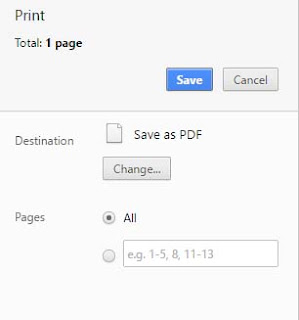
Remove Aadhaar Card PDF Password Permanently with Google Chrome Browser
Also Read: How to Find Aadhaar Card PDF Password on Acknowledgement or Resident Copy
But today I will provide you one trick which will help to remove Aadhaar Card PDF Password Permanently from the file. Some time it becomes difficult to enter the password again and again to open your e-Aadhaar Card PDF File as well as some times you forget what is the password to open your Aadhaar Card PDF Document.
So to come out of this trouble or situations it is always better to remove Aadhaar card PDF Password Permanently from the file so that you will able to open your Aadhaar Card PDF File without entering any password.
Now let’s get familiar with how to remove Aadhaar Card PDF Password Permanently.
Guide on How to Remove Aadhaar Card PDF Password Permanently
There are several methods to remove aadhaar card pdf password permanently from the file, but here I am disclosing the method which will help you to remove the password from aadhaar card pdf file permanently.
Remove Aadhaar Card PDF Password Permanently with Google Chrome Browser
- Just open your e-Aadhaar Card PDF File with Google Chrome Browser, enter the password and open it.
- Once your Aadhaar Card PDF gets opened in Google Chrome, just click print by accessing file menu or press shortcut Ctrl+P on Windows or CMD+P on mac.
- Set the destination printer to Save as PDF and click on print button.
- Next you will have to set name for the file to be saved and destination where you want to save the new file, just select and save it.
Also Read: How to Find Aadhaar Card PDF Password on Acknowledgement or Resident Copy
Available link for download
Wednesday, March 22, 2017
How to Remove E Aadhaar Pdf File Password
How to Remove E Aadhaar Pdf File Password
When you open E Aadhaar Pdf file it asks the password in password prompt every time. If you want to open E Aadhaar pdf file without password , you need to remove password from E Aadhaar pdf file . You can easily remove E Aadhaar pdf Password Online .
There are two ways to remove pdf password.

Register Your mobile in Aadhaar Online via Free Android App Aadhaar Updater
There are two ways to remove pdf password.
Online from Website.
- First open the website http://www.pdfunlock.com/
- Upload pdf file from Computer or Dropbox or Google Drive.
- Click on Unlock Button
- Enter Your pdf Password (Only once)

- After entering pdf Password Click Unlock
- Now your Unlocked E Aadhaar pdf file will be download into your Computer.
- Save it and Open it without Password.
Pdf Unlocker Software.
- You Can Unlock your pdf file password via Pdf Unlocker (software)
- To download Pdf Unlocker Software form website http://pdf-password-remover.en.softonic.com/
- Download the Software and enjoy unlocking pdf files.
Register Your mobile in Aadhaar Online via Free Android App Aadhaar Updater 
Available link for download
Tuesday, March 7, 2017
Computer Ka Password Kaise Unlock Kare
Computer Ka Password Kaise Unlock Kare
Computer Login Password Kaise Tode Bina Kisi Softwere Ke
Hello Dosto aaj ka mera post aapke liye bahut helpful rahega isme mai aapko windows me login password ko unlock karne ke bare me bata raha hu jisme aap computer me bina old password jane apne computer ka password change kar sakte hai aur password tod bhi sakte aap ne bahut se tricks padhe honge magar ye tricks ek dam new hai
computer me password ko todna koi badi baat nahi hai magar iski jankari me aapki bahut atche se batane wala hu lekin aaj jo mai aapko batane wala hu wo sirf jankari rakhne ke liye hai iska aap log galat use naa kare mai aapse request karta hu
Computer Me Password Kaise Unlock Kare Ya Password Crack Kare
Computer me login password ko unlock karne ke liye aapko kisi softwere download karne ki jarurat nahi hai balki aap badi aasani se apne computer ka password change kar sakte hai wo bhi bina old password jane ye trick harek window mw work karega to chaliye dosto suru karte hai password kaise tode old password ke bina Aap mere step ko follow kare password todne ke liye
Step 1: sabse pehle aap apna computer ya laptop ko open kare
Step 2: Uske bad aap MYComputer par Right click karke manage par click kare

Step 3: Ab Aapko Manage Par Click Karne Ke Bad Aap Local Users And Groups Par Click Kare

Step 4: Ab aap user par click karke Administraor par Right click karke Phir set password par click karke new password dale Uske bad aap Ok par click kare
Ab aapka new password set ho chuka hai wo bhi bina old password jane aur mai aapse request karta hu iska galat upyog naa kare balki kisi dusre ki help kare
to dosto ye jankari aapko kaisa laga comment me jarur bataye aur mai apne aane wale post me mai aapko ye bataunga ki bina password ke computer ko unlock kaise kare ye post mai aapke samne jald hi post karunga
Ye Post Jarur Read Kare:
Computer se related tricks ki jankari pane ke liye yaha click kare
Android Mobile ki tricks ki jankari pane ke Liye Yaha Click Kare
Recharge Tricks Ke Liye Yaha Click Kare
Computer Funny Tricks Ki Janakari Pane Ke Liye Yaha Click Kare
Aap Mere Site Ke Facebook Page jarur Like Kare tricks atcha laga hai to comment aur subscribe jarur kare thanks
Available link for download
Saturday, March 4, 2017
How to Add a Password on a Folder
How to Add a Password on a Folder
How to Add a Password on a Folder

1.Right click on the folder on that you want add password.

2.Click on add to archive. The above window will show.

3.Click on the Advanced tab and click on Set Password.

4.Now add the password and confirm it.

5.Click on Encrypt file names and click OK.
6.Delete the original file and then open the new file.

7.Type the password and its done.
Available link for download
Subscribe to:
Posts (Atom)