Showing posts with label check. Show all posts
Showing posts with label check. Show all posts
Thursday, June 29, 2017
How to check whether Aadhaar Number is linked to Bank Account
How to check whether Aadhaar Number is linked to Bank Account
Now Aadhaar Portal offers freedom to its residents to check whether their Aadhaar Number is linked to Bank Account. This feature have proved very important to residents as they are easily able to check if Aadhaar is linked to bank account by using Check your Aadhaar Linking Status with Bank from Online Aadhaar Portal without visiting bank to confirm if their Aadhaar Number have been successfully linked to their bank account or not.
So below is the procedure on How to check whether Aadhaar Number is linked to Bank Account.


Alternatively without internet you can also check whether Aadhaar Number is linked to Bank Account through Mobile free of cost. So what is the procedure to check if Aadhaar Number is linked to Bank Account through Mobile by dialing USSD code you will know it by following below procedure.


So below is the procedure on How to check whether Aadhaar Number is linked to Bank Account.
How to check whether Aadhaar Number is linked to Bank Account Online [Check Aadhaar Linking Status with Bank]
- Just visit Check Aadhaar Linking Status with Bank page by clicking here.
- Once you are on the page Check Aadhaar Linking Status with Bank, enter UID Number or Aadhaar Number below you will find security code in the image just reenter it in the textbox provided and click on Verify button.
- On clicking verify button if your Aadhaar Number is linked with bank it will show your Aadhaar Number is linked with Bank and if it is not linked with any bank it will show “Your aadhaar is not linked to a bank”.
How to check whether Aadhaar Number is linked to Bank Account through Mobile [Check Aadhaar Linking Status with Bank]
Alternatively without internet you can also check whether Aadhaar Number is linked to Bank Account through Mobile free of cost. So what is the procedure to check if Aadhaar Number is linked to Bank Account through Mobile by dialing USSD code you will know it by following below procedure.
- From your mobile just dial *99*99*#.
- It will ask you to “Please enter your 12 digit Aadhaar Number” Enter your Aadhaar Number and tap on Send Button.
- Again in next screen it will ask you to confirm your Aadhaar Number so to confirm you will have to enter 1 and tap on send button.
- In next screen you will get to know whether your Aadhaar Number is linked to bank account or not, if your Aadhaar Number is linked with bank account it will show you that Aadhaar Number is linked with Bank Account and if your Aadhaar Number is not linked with any bank it will show “Sorry, the Aadhaar Number you have entered is not linked with any bank”.
Also Read: Linking Aadhaar Card with SBI Bank Account Online
Available link for download

Tuesday, June 20, 2017
How to Check Status of your Aadhaar Card through SMS
How to Check Status of your Aadhaar Card through SMS
To Check Aadhaar Card Status now its simple many options have been added to Check Status of your Aadhaar Card one of the method is Online through website and the other method to check status of Aadhaar Card is through SMS, this is convenient to every body because in India every one will be having Mobiles and they also know to operate so below are the steps to check status of Aadhaar Card.
For Eg. If your Enrollment number is 1800/1619/0579, then you have to send
UID STATUS 180016190579 to 51969
EID means your enrollment number when you get enrolled for Aadhaar Card you will be given an Acknowledgement Slip in that slip your EID Number is mentioned that number you have to enter to check the status.
If you have lost the Acknowledgment Slip of Enrollment Number (EID) Number than you cannot check your Aadhaar Card Status.
Also Read: UIDAI Aadhaar Card Online Registration
TYPE
UID STATUS <14 DIGIT EID>
and send it to
51969
For Eg. If your Enrollment number is 1800/1619/0579, then you have to send
UID STATUS 180016190579 to 51969
EID means your enrollment number when you get enrolled for Aadhaar Card you will be given an Acknowledgement Slip in that slip your EID Number is mentioned that number you have to enter to check the status.
If you have lost the Acknowledgment Slip of Enrollment Number (EID) Number than you cannot check your Aadhaar Card Status.
Also Read: UIDAI Aadhaar Card Online Registration
Available link for download
Saturday, June 17, 2017
Check Aadhaar linking Status with Bank
Check Aadhaar linking Status with Bank
If you have submitted the application for linking your Aadhaar card with your Bank Account and you want to check whether your Aadhaar card has been link with your Bank Account. It is easy to find out Aadhaar linking Status Online . Follow these Steps. ??? ???? ???? ????? ?? ???? ???? ?? ???? ???? ?? ??? ????? ???? ?? ?? ?? ?? ??? ???? ????? ??? ?? ???? ???? ???? ???? ???? ?? ???? ??? ?? ?? ???? ? ?? ??? ???? ???? ?? ???? ?? ????? ??????? ?? ??????
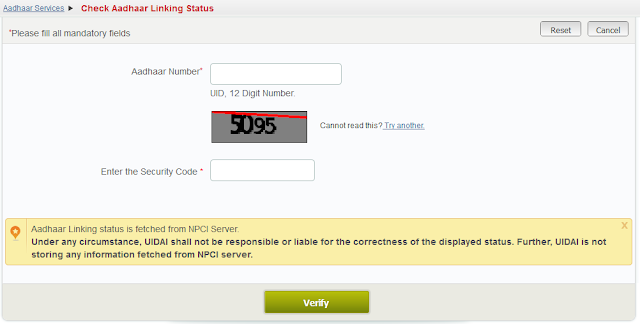
- Go to the official website of UIDAI. Click here / ???? ???? ??????? ??????? ?? ???? ?
- Click On Check Your Aadhaar Linking Status with Bank ?? ????? ???? ?
- Enter Your 12 digit Aadhaar Number ./ ???? 12 ???? ?? ???? ???? ????? ?
- Enter Security Code and Click On Verify.?????????? ??? ????? Verify ?? ????? ???? ?

Now the current status will be appear . ???? ????? ???? ???? ???? ???? ??????? ?????? ????? ????
You Can check the current status by dialing This format
Just type *99*99# from your mobile. It will ask Aadhar card number, type aadhar card press OK then press 1. You will get Bank name linked with Aadhaar card Number.
Available link for download
Friday, June 16, 2017
AADHAAR CARD STATUS CHECK YOUR AADHAAR CARD STATUS
AADHAAR CARD STATUS CHECK YOUR AADHAAR CARD STATUS
Indian Govt. prestigious project Aadhaar card going on well. In the process we are facilitated to check our Aadhaar card status .
In order to check Our card status we need to have the enrollment Number which is printed on the receipt , which is given you at the time of Aadhaar card enrollment .
This number number will consist of 14 digits followed by date , month, year and hours minutes and seconds.
After entering the number you need to enter the images code displayed just beside the box and press verify , then you will come to kjonw the status of the card.
CLICK HERE TO CHECK THE STATUS
Available link for download
Thursday, June 15, 2017
Aadhaar Card Update Status Check Online
Aadhaar Card Update Status Check Online
Have your updated your Aadhaar Card due to previous mistakes or errors in your Aadhaar Card, so after correction or update of your Aadhaar Card do you want to know Aadhaar Card Update Status than there is good news for your that now you can check your Aadhaar Card Update Status Online.

Aadhaar Card Official Portal now allows the users to track their Aadhaar Card Update Status Online, now every individual who have updated your Aadhaar Card or made correction in Aadhaar Card now can track their Aadhaar Card Update Status Online easily through Aadhaar Card Official Portal. Below steps will show you how you can trace your Aadhaar Card Update Status Check Online.
Go to https://ssup.uidai.gov.in/web/guest/check-status

Enter your Aadhaar Card Number and URN Number and click on Get Status to know your Aadhaar Card Update Status.
Also Read: Aadhaar Enrolment Correction Form Free Download
Aadhaar Card Official Portal now allows the users to track their Aadhaar Card Update Status Online, now every individual who have updated your Aadhaar Card or made correction in Aadhaar Card now can track their Aadhaar Card Update Status Online easily through Aadhaar Card Official Portal. Below steps will show you how you can trace your Aadhaar Card Update Status Check Online.
Go to https://ssup.uidai.gov.in/web/guest/check-status
Enter your Aadhaar Card Number and URN Number and click on Get Status to know your Aadhaar Card Update Status.
Also Read: Aadhaar Enrolment Correction Form Free Download
Available link for download
Tuesday, June 13, 2017
HBSE 12th Result 2016 Declared Check Here
HBSE 12th Result 2016 Declared Check Here

Haryana Board students are informed that HBSE 12th Result 2016 is set to be declared by the educaiton minister of Haryana state education minister Sh. Ram Bilas Sharma along with Haryana Board chairman Dr. Jagbir Singh. So Dear students see your exam result of 12th class on the official website bseh.org.in or hbse.ac.in. Here on this page our team will be update the Haryana Board 12th Result 2016 as it declared officially. Wishing you good luck for your result.
About HBSE
HBSE is also known as The Haryana Board of School Education. The board was established in the year 1969. HBSE is a very famous board. The main aim of this board is to conduct the examinations at middle, secondary or high school and senior secondary school (Academic & Vocational) levels twice in a year.
CLICK HERE FOR RESULT
There are many private and government schools, which are affiliated under this board. Haryana Board always tries to provide quality education to all students.
Haryana Board 12th Results 2016
The Haryana Board Secondary Education organized the 12th board exam for all streams like Science, Arts and Commerce in the month of March every year. This year, huge numbers of students appeared 12th class examination under this board. Board will declare Haryana Board 12th Results 2016 in the month of May 2016 at the official website that is bseh.org.in. Students will check the result by name wise and roll number wise. Some important steps and links to check the result are mentioned below, which are really helpful for all students.
CLICK HERE FOR RESULT
Available link for download
Sunday, June 11, 2017
Check Mobile Number
Check Mobile Number
How to Check Mobile Number of Aadhaar Card or E-Aadhaar Card:
For Checking Mobile Number of Aadhaar:
- Visit the link: https://portal.uidai.gov.in/ResidentPortal/verifyLink
- Once the link is opened you have to fill the data required on the website i.e.
- Enter Enrollment Number & Date and Time
- And enter the below image text shown.
- or Enter Aadhaar Number
- Enter Mobile Number and enter the below image text shown.
- After completing the form Press Submit.
Incoming Search Term:
- Check Mobile Number Aadhaar Card
- Check Aadhaar Mobile Number
- Mobile Number Aadhaar Card
- Adhar Card Mobile Number
- Check Mobile Number Aadhar Card
Available link for download
Thursday, June 8, 2017
AP Rythu Runa Mafi 3rd Phase List Staus check apcbsportal ap gov in online
AP Rythu Runa Mafi 3rd Phase List Staus check apcbsportal ap gov in online
Check AP Rythu Runa Mafi List 2015 www.apcbsportal.ap.gov.in status Online : Andhra Pradesh Crop Loan / Gold Loan Phase 3 list has published at apcbsportal gov ( Official site) of Andhra Pradesh Government.Farmers waiting to check their Crop Loan status Online & Gold Loan status for Loan Waiver can check if they are selected or Rejected for Clearing off the Loan amount.Further details to check online for their loan status is provided below:
 Our Honorable Nara Chandra Babu Naidu,Chief Minister has announced to clear off the Farmer Loan or Crop Loan.The AP State Government divided the Farmer Loan Waiver Scheme in to 3 states.Already 2 phases of Crop Loan Waiver have been completed.Farmers had under gone through the process of submission of required documents to be submitted to the official and check their Runa Mafi status at official site http://www.apcbsportal.ap.gov.in/ .This post consists of instructions on how to check Online Rythu Runa Mafi status selected list of Crop loan and Check Raitu Runa mafi Status of Gold Loan online Those whose names were not listed in the previous states can check for their Gold Loan Waiver raitu loan clearing off list at official site.
AP Rythu Runa Mafi 3rd Phase List 2015 Check Gold Loan / Crop Loan Status Online
Our Honorable Nara Chandra Babu Naidu,Chief Minister has announced to clear off the Farmer Loan or Crop Loan.The AP State Government divided the Farmer Loan Waiver Scheme in to 3 states.Already 2 phases of Crop Loan Waiver have been completed.Farmers had under gone through the process of submission of required documents to be submitted to the official and check their Runa Mafi status at official site http://www.apcbsportal.ap.gov.in/ .This post consists of instructions on how to check Online Rythu Runa Mafi status selected list of Crop loan and Check Raitu Runa mafi Status of Gold Loan online Those whose names were not listed in the previous states can check for their Gold Loan Waiver raitu loan clearing off list at official site.Good news for the Farmers who are waiting AP Gold loan or the Crop Loan updates regarding the loan clearing process.Since,they can Check Status of AP Runa Mafi 3rd Phase list soon at www.apcbsportal.ap.gov.in
You can check your Gold loan / Raithu runa mafi status in the 3rd phase from one of the following sites:
http:apcbsportal.ap.gov.in/loanstatus/
http:164.100.132.115/loanstatus
http://125.21.84.139/loanstatus
As per the latest news, The AP loan waiver scheme for clearing off the loan of farmers list village wise and bank wise will likely to be placed in official website as soon as possible.. AP Govt,will pay the amount that will be credited after list released this month. Farmers who submitted Aadhaar, ration card and proper land details will get benefits from loan waiver scheme of rythu runa mafi process for loans
As per the latest news, The AP loan waiver scheme for clearing off the loan of farmers list village wise and bank wise will likely to be placed in official website as soon as possible.. AP Govt,will pay the amount that will be credited after list released this month. Farmers who submitted Aadhaar, ration card and proper land details will get benefits from loan waiver scheme of rythu runa mafi process for loans
Check AP Rythu Runa Mafi 3rd Phase Status Online
You can check Andhra Pradesh Raitu loan clear off status through aadhar card link or ration card or loan account number or ration card number. Instructions are as follows:
- Go to the official website www.apcbsportal.ap.gov.in
- Enter the number available with you (aadhar or ration or loan account number)
- Click on GET Button and check Loan Waiver Scheme details if selected or rejected complete details in the next window
Official Link to check the status of Rythu Runa Mafi 3rd Phase list 2015 of AP gold or crop loan can be checked from here : http://www.apcbsportal.ap.gov.in/
Available link for download
Tuesday, May 23, 2017
Aadhar Card Status Check Online resident uidai net in
Aadhar Card Status Check Online resident uidai net in
Check Aadhar Card Status Online resident.uidai.net.in
In this article, We will discus about how to check aadhar card status online. Welcome to www.iaadharuidai.blogspot.in, We all know that the Aadhar Card - Aam Aadmi ka Aadhikar/ UIDAI is very important document at this time in India. Most benefit of Aadhar Card is proof of identity in all over India for individual.Official Link to Check Aadhar Card Status - resident.uidai.net.in/check-aadhaar-status
How to Check Aadhar Card Status
If you not applied yet then you must apply immediately. Aadhar Card is a 12 digit unique identification number which is issued by Unique Identification Authority of India - UIDAI - uidai.gov.in.Get Aadhar Card
Aadhar Card Form
Apply Aadhar Card
Aadhar Card Form
Apply Aadhar Card
Procedure to Check Aadhar Card Number Status Online
Now come to the point, how to Check Aadhar Card Status Online. It is very easy process to Check Aadhar Card Status Online in Mobile/ Smart Phone and Computer/ Laptop/ PC. The procedure to check uid/ aadhar number given below.Aadhar Card Status
The official website of the Unique Identification Authority of India UIDAI provides the details regarding to Track Aadhar Card status - resident.uidai.net.in.
What Need to Check Aadhar Number/ UID Number
Enrollment Id / EID Number or Acknowledgment Slip.What Is Enrollment Id/ EID of Aadhar Card - EID is 14 digit unique number which is printed on Acknowledgment Slip. Your Enrolment Number in Acknowledgement Slip provided at the time of Enrolment.
Read Also
Download Aadhar Card
Print Aadhar Card
Update Aadhar Card
Print Aadhar Card
Update Aadhar Card
Step to Track Aadhar Card Number Online
Visit on - uidai.gov.in.Click on - Aadhaar Services (Enrolment/Download E-aadhaar/Update)
Click on - Check Aadhaar Status.
1. First of all visit on the main webpage of Unique Identification Authority of India - UIDAI which is uidai.gov.in/.
2. Then find the test link "Aadhaar Services (Enrolment/Download E-aadhaar/Update)" in home page of uidai - uidai.gov.in/.
3. Now you will be redirect on the Aadhaar Kiosk! - resident.uidai.net.in/.
4. In Aadhaar Kiosk! website, find the test link "Check Aadhaar Status" and click on it.
5. Please fill all mandatory fields in blanks.
Enter Enrolment ID (14 digit number with Date & time)
Enter Security code given in image
6. At last click on the "Check Status" Button.
Important Links for You -
Apply for Aadhaar Card
Download E-Aadhaar Card Online
Update Aadhaar Card Online
Check Status of Aadhaar Card Online
If your aadhar number will be generated then shown in your computer and mobile screen. Now you can download your aadhar card online through uidai website which is - eaadhaar.uidai.gov.in/.
Thank you for visting on www.iaadharuidai.blogspot.in. More details about aadhar status please comment.
Available link for download
Monday, May 22, 2017
Check Aadhaar Card Status Online
Check Aadhaar Card Status Online
Check Aadhaar Card Status Online | Check Aadhaar Card Status Online, Aadhaar Card Download Online, AADHAAR CARD FREE DOWNLOAD, AADHAAR CARD STATUS, AADHAAR CARD STATUS ONLINE, AADHAR CARD DOWNLOAD, AADHAR CARD FREE DOWNLOAD,
Aadhar card is a unique identification number which consists of 12 digits, It is issued by UIDAI (Unique Identification Authority of India).This card will be given for each & every citizen of India. This 12 digit number is stored in a centralized database and it acts as a key to open citizen’s photograph and fingerprints.
Check your Aadhaar Card Status
- Visit UIDAI Government Website http://eaadhaar.uidai.gov.in/eDetails.aspx
- Enter your Enrollment Number (it will be on your aadhaar card application)
- Then Enter Date and Time (it will be exactly on top of your Aadhaar Card)
- Enter your ZIP Code.
- Enter the Random Security Check Code.
- Press Submit (On Right Corner of the web page)
Available link for download
Monday, May 15, 2017
How to check Aadhaar status through SMS
How to check Aadhaar status through SMS
To check the status of your Aadhaar , there are many option available . You can check the status of your Aadhaar online through the link https://resident.uidai.net.in/web/resident/check-aadhaar-status. Other option is sms or call Aadhaar Aadhaar customer care. To check Aadhaar status through SMS, this is convenient to every body because in India every one will be having Mobiles.the steps to check status of Aadhaar Card is given below
TYPE
UID STATUS <14 DIGIT EID>
and send it to
51969
51969
For Example:- If your UID is 0206/50431/07972.
then Type in Message Box :- UID STATUS 02065043107972
And send it to 51969
then Type in Message Box :- UID STATUS 02065043107972
And send it to 51969
Note- If you have lost the Acknowledgment Slip of Enrollment Number (EID) Number than you cannot check your Aadhaar Card Status.
Available link for download
AP Ration Card Online Registration Check Status Correction New Application apcivilsupplies gov in
AP Ration Card Online Registration Check Status Correction New Application apcivilsupplies gov in
AP Ration Card Online Registration Check Status
AP ration card online download from www.apcivilsupplies.gov.in | Lost ration card how to get new ration card online | apply Ration card Online application form | Check status of AP Ration Card correction online | how to do corrections in Andhra Pradesh Ration Card Corrections online | Check Ration Card Status online apcivilsupplies.gov.in | AP Ration Card Online Registration download form
AP Ration card Online application www.apcivilsupplies.gov.in

AP Ration Card Online Download from http://www.apcivilsupplies.gov.in/ People of Andhra Pradesh :AP can download the ration cards online from the official website of Civil Supplies Department web portal.Generally, Ration card is an official document provided by that particular state to its citizens those who are considered eligible for the receiving of ration items like kerosene, sugar,dhal,rice etc,. as per the Civil Service supplies.Its an either a A-4 size folded paper card or now a days its like a chip embedded smart card,that contains the photo of the family that is eligible for getting the food items with concession prices / less price from the Civil supplies production under took by the Government of AP Andhra Pradesh
Civil Supplies is a regulating body under the control of Andhra Pradesh. AP Civil supplies regulates the suppliers of food items like food grain under MSP,rice,sugar,kerosene,oil,wheat,dhal etc,.Eligible candidates can get the Civil supplies details at www.apcivilsupplies.gov.in .Instructions given on how to apply for New ration card through Ration card Online application.
How to Download AP Ration Card
Either you lost your ration card or applying online to new ration card,you can follow the following instructions.Generally there are two types Ration cards in Andhra Pradesh as :
- White ration card
- Pink ration card
Download lost Andhra Pradesh Ration Card online at official website:
- First of all,go to the official website www.apcivilsupplies.gov.in
- In the home page,on the left corner find the link for "Online Ration card search or ration card information" to download ration cards
- In the next window,you will get option for search button
- There,you have to enter your ration card number and search
- New ration card will be displayed,there check the details and then download it if pdf form
- Take print out of ration card.
Check Andhra Pradesh Ration Card Status apcivilsupplies.gov.in

AP Ration card online can download at the official website of the civil supplies department.Candidates who lost their card can now easily download by making AP Ration card online registration.If you have applied for the card and searching to check ration card status online and have any mistakes and need to make corrections in the form can also be done at the official site of Civil Supplies i.e www.apcivilsupplies.gov.in
If you have applied for a new ration card and did not received the card or it there is any issues you can simply solve with the following instructions to check Ration card status online at the official website.
Documents required : AP Ration card online registration
- Go to the official website of AP Civil supplies
- Click on Registration option in the home page
- Give the required details in the form,then you will get a User name and Password
- Complete the application form in correct form
- You will require passport size photo of the Head of the Family on application
- Old cancelled/ surrendered ration card
- Local certificate/residence certificate
Detailed screen shots are available at the official website link provided below.To provided service to the people,the civil services have itself computerized the details in its site to easily download them.
http://www.apcivilsupplies.gov.in/
How to apply AP Ration Card Online application
- Go to the official website www.apcivilsupplies.gov.in
- Find the link for Ration card Information in the home page
- You will get page for epds.ap.gov.in/epdsAP/epds
- In this window,find the option you require like New Ration card Registration to get new card.
- To Check Ration card status click on the option to "check the status of ration card"
- If you want to make any corrections or modifications in the card, then click on "make Ration card corrections"
- Submit the form.
Make corrections of ration card / check status:
As specified above,you can make any changes/modification corrections in Ration card by going to the official link-->click on the ration card information (left side options in the home page)--->next page you will get search option,there selection corrections in the card option and make modifications and submit.
Important Links:
AP ration card search to get answers
AP ration card search to get answers
AP Ration card online
epds.ap.gov.in/epdsAP/epds
Found the content useful.Like n Share..Have any doubts/comments/query/please drop in the comment box below.
Available link for download
Saturday, May 13, 2017
Check Aadhaar Card Status by Name and Date of Birth
Check Aadhaar Card Status by Name and Date of Birth
In past this facility to check Aadhaar Status by name and date of birth was not available in official UIDAI Website. But in recent times due to people’s needs UIDAI have added several features on their UIDAI Website and one of them is to Check Aadhaar Card Status by Name and Date of Birth.
So now let’s move on with the process on how to check Aadhaar Card Status by Name and Date of Birth.
Procedure to Check Aadhaar Card Status by Name and Date of Birth
To Check Aadhaar Card Status you will need Aadhaar Enrollment Number and if you have lost that number or if you don’t have Aadhaar Enrollment Id with you which is printed on Aadhaar Card Enrollment Slip than this will give you a total solution from your problem.
The Aadhaar UIDAI Kiosk Portal have added service which now allows you to easily check Aadhaar Card Status by Name and Date of Birth (DOB).
So to check status of Aadhaar Card by Name and Date of Birth you will just need exact full name and mobile number which you had given while you have enrolled for Aadhaar.
To recover your lost Aadhaar Enrolment Number you will have to first visit UIDAI Aadhaar Kiosk Portal by accessing URL https://resident.uidai.net.in/find-uid-eid
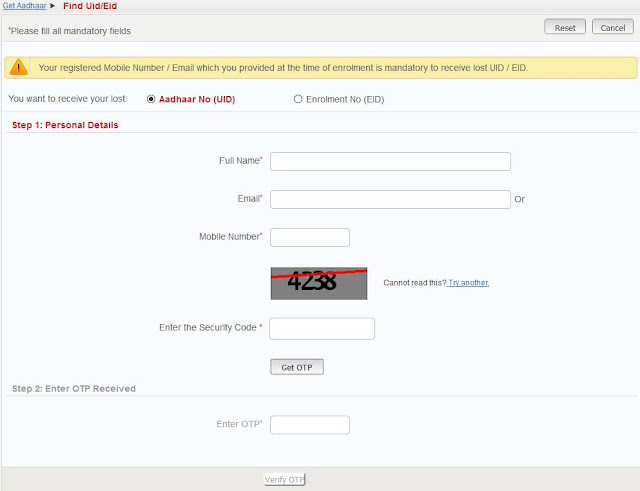
On opening the website, from first option “You want to receive your lost: Aadhaar No (UID) or Enrolment No (EID)” choose Enrolment No (EID).
And carry on entering the other details asked in the form like Full Name, Enter Mobile Number or Email Id, than solve the captcha and click on Get OTP.
You will receive Once Time Password (OTP) on your mobile number or email whichever you have entered in the form.
Just check your email or SMS for OTP and enter the One Time Password in in Enter OTP box in the form and click on Verify OTP.
Now you will receive your Aadhaar Card Enrolment Number on your mobile number through SMS or on email id whichever you have entered in the form.
So access your email or message inbox to get your Aadhaar Enrolment Number, so now you have your Aadhaar Enrolment ID and now you can carry on with the process to check Aadhaar Card Status.
Usually there are various options available to check Aadhaar Card Status they are offline mode and online mode. If you are good in online method you can check status of Aadhaar through Online
Process and if you like Offline method than you can check Aadhaar card Status through Offline method.
Below we have mentioned both the ways to check aadhar status.
Aadhaar Card Status Enquiry through Online Method
To Check Aadhaar Status Online visit Aadhaar Kiosk Portal by accessing URL https://resident.uidai.net.in/check-aadhaar-status

Enter the Enrollment Id with date and time in the box and solve the captcha.
And click on check status, one next screen you will get to see the current status of your Aadhaar Card.
Aadhaar Card Status Enquiry through Offline Method
Just dial UIDAI Toll Free Number 1800-300-1947, and get to know your status of Aadhaar Card by providing them enrolment id.
From your mobile just text UID STATUS <Your 14 digit enrollment number> and send it to 51969.
This is how easily you can check Aadhaar Card Status by Name and Date of Birth.
So now let’s move on with the process on how to check Aadhaar Card Status by Name and Date of Birth.
Procedure to Check Aadhaar Card Status by Name and Date of Birth
To Check Aadhaar Card Status you will need Aadhaar Enrollment Number and if you have lost that number or if you don’t have Aadhaar Enrollment Id with you which is printed on Aadhaar Card Enrollment Slip than this will give you a total solution from your problem.
The Aadhaar UIDAI Kiosk Portal have added service which now allows you to easily check Aadhaar Card Status by Name and Date of Birth (DOB).
So to check status of Aadhaar Card by Name and Date of Birth you will just need exact full name and mobile number which you had given while you have enrolled for Aadhaar.
To recover your lost Aadhaar Enrolment Number you will have to first visit UIDAI Aadhaar Kiosk Portal by accessing URL https://resident.uidai.net.in/find-uid-eid
On opening the website, from first option “You want to receive your lost: Aadhaar No (UID) or Enrolment No (EID)” choose Enrolment No (EID).
And carry on entering the other details asked in the form like Full Name, Enter Mobile Number or Email Id, than solve the captcha and click on Get OTP.
You will receive Once Time Password (OTP) on your mobile number or email whichever you have entered in the form.
Just check your email or SMS for OTP and enter the One Time Password in in Enter OTP box in the form and click on Verify OTP.
Now you will receive your Aadhaar Card Enrolment Number on your mobile number through SMS or on email id whichever you have entered in the form.
So access your email or message inbox to get your Aadhaar Enrolment Number, so now you have your Aadhaar Enrolment ID and now you can carry on with the process to check Aadhaar Card Status.
Usually there are various options available to check Aadhaar Card Status they are offline mode and online mode. If you are good in online method you can check status of Aadhaar through Online
Process and if you like Offline method than you can check Aadhaar card Status through Offline method.
Below we have mentioned both the ways to check aadhar status.
Aadhaar Card Status Enquiry through Online Method
To Check Aadhaar Status Online visit Aadhaar Kiosk Portal by accessing URL https://resident.uidai.net.in/check-aadhaar-status
Enter the Enrollment Id with date and time in the box and solve the captcha.
And click on check status, one next screen you will get to see the current status of your Aadhaar Card.
Aadhaar Card Status Enquiry through Offline Method
Just dial UIDAI Toll Free Number 1800-300-1947, and get to know your status of Aadhaar Card by providing them enrolment id.
OR
From your mobile just text UID STATUS <Your 14 digit enrollment number> and send it to 51969.
This is how easily you can check Aadhaar Card Status by Name and Date of Birth.
Available link for download
Wednesday, May 10, 2017
Check Adhaar card Status Using Toll Free and SMS
Check Adhaar card Status Using Toll Free and SMS
?Check Adhaar card Status Using Phone(Toll Free Number)
Simply Dial 1800-300-1947 and Get Your Adhaar Status Easily Even without Internet. Using this Aadhar Toll Free Number, You can Check Your Aadhar Card Status Anytime without any charge.?Track Aadhar Status using SMS
There will be a normal sms charge to send sms. You will get Your Aadhar status Only if You Send message to uidai using your registered mobile number. You have to send message from the number you have registered at the time of adhaar enrollment. Let Me show How!Send SMS Like this: UID STATUS <14-digit Enrollment Number>
Note: All letters Should be Capital
Now, Send this sms to 51969.
You will Recieve a message in less than a Minute.
You will get a message like this: Congratulations, Your adhaar Has been Generated by UIDAI and will be delievered soon.
Sometimes, You will get message like this: “Your aadhar is in Process”, You should wait for sometime. usually, the Adhaar got generated under 90 days of enrollment.
Available link for download
Tuesday, May 9, 2017
How to Check Aadhaar Card Status by Name
How to Check Aadhaar Card Status by Name
Once you get enrolled for Aadhaar Card it usually takes two to three months to receive your Aadhaar Card. On other hand you can always check status of your Aadhaar Card progress.
Once you get registered for Aadhaar Card you will be provided with the Aadhaar Card Acknowledgement Slip on which your 14 digit enrollment number with date time stamp and other demographic details will be printed.
This 14 digit enrollment number (EID) with date time stamp helps you to check status of your Aadhaar Card Online easily and if you have lost this Aadhaar Card Enrollment Slip and Aadhaar Card Enrolment ID, you can still check status of your Aadhaar Card by Name by following below steps on How to Check Aadhaar Card Status by Name.
Steps to Check Aadhaar Card Status by Name
First of all to check aadhaar card status you will need your Aadhaar Card 14 digit enrollment number or EID, which you can easily recover online.

Also Read: Aadhaar Card Download Online
Once you get registered for Aadhaar Card you will be provided with the Aadhaar Card Acknowledgement Slip on which your 14 digit enrollment number with date time stamp and other demographic details will be printed.
This 14 digit enrollment number (EID) with date time stamp helps you to check status of your Aadhaar Card Online easily and if you have lost this Aadhaar Card Enrollment Slip and Aadhaar Card Enrolment ID, you can still check status of your Aadhaar Card by Name by following below steps on How to Check Aadhaar Card Status by Name.
Steps to Check Aadhaar Card Status by Name
First of all to check aadhaar card status you will need your Aadhaar Card 14 digit enrollment number or EID, which you can easily recover online.
- So to recover your lost Aadhaar Card Enrollment ID just visit https://resident.uidai.net.in/find-uid-eid
- Select you want to receive your lost enrollment no (EID)
- Enter your full name, email id, mobile number, enter the security code and click on Get OTP button.
- Enter the OTP received on your registered mobile number in below enter otp field and click on verify OTP.
- You will received your Aadhaar Enrollment Number (EID) on your registered mobile number.
- So now your know your Aadhaar Card Enrollment Number and you can carry on to next step to check Aadhaar Card Status by Name.
- Go to Check Aadhaar Status Page by clicking here.
- Enter the Enrollment Number with date, time as you have received message on your registered mobile number, enter the security code and hit on Get Status.
- On next page you will get to know the status of your Aadhaar Card.
Also Read: Aadhaar Card Download Online
Available link for download
Tuesday, April 25, 2017
How to Check BIOS Version
How to Check BIOS Version
How to Check BIOS Version
A computers BIOS is the firmware interface between a computers hardware and its operating system. Like any software, the BIOS can be updated. Knowing your computers BIOS version can tell you if you have the most up-to-date version of the BIOS. On Windows computers, you can get the BIOS version using the Command Prompt, by entering the BIOS menu at boot, and, on computers with Windows 8 pre-installed, via the new UEFI interface, which lets you access the BIOS without rebooting. Macs dont have a BIOS, but you can find the computers firmware via the Apple menu.
****************************************************************************************
Method1 :- Finding the BIOS Version on Windows Computers Using the Command Prompt
1.Click the Start menu, and then click Run.
- In Windows 8, right-click the Start menu, and then click Run. You can also access this menu by pressing the WIN + X keys
2.In the Run dialog box, type cmd.
3.The Command Prompt window opens.
- The Command Prompt is a program lets you control your computer with text commands.
- Type wmic bios get smbiosbiosversion. The string of letters and numbers following SMBBIOSBIOSVersion is your BIOS version.
4.Write down the BIOS version number.
****************************************************************************************
Method2 :- Finding the BIOS Version on Windows Computers Using the BIOS Menu
1.Reboot your computer.
2.Open the BIOS menu. As the computer reboots, press F2, F10, F12, or Del to enter your computer BIOS menu.[3]
- You may need to press the key repeatedly, as boot times for some computers can be very quick.
- Find the BIOS version. In the BIOS menu, look for text that says BIOS Revision, BIOS Version, or Firmware Version.
3.Write down the BIOS version number.
****************************************************************************************
Method3 :- Finding the BIOS Version on a Pre-Installed Windows 8 Computer
1.Restart your computer. While the computer reboots, press and hold the Shiftbutton until you see the boot options menu.
2.Open the Troubleshoot menu. On the boot options screen, click Troubleshoot.
3.Open UEFI Firmware Settings. On the Advanced options screen, click UEFI Firmware Settings.
- If you dont see UEFI Firmware Settings, your computer didnt have Windows 8 pre-installed, and youll need to get the BIOS version via the command prompt or the BIOS menu.
4.Click Restart. The computer reboots into the UEFI firmware settings screen.
5.Look for the UEFI version. Depending on your computer hardware, youll see different information. The UEFI version will usually be under the Main or starting tab.
6.Write down the UEFI number.
****************************************************************************************
Method4 :-
Finding the Firmware Version on a Mac
1.Open About This Mac. Click the Apple menu, and then click About This Mac.
2.Get the Mac system report. Click More Info, and then click System Report.
3.Get the Boot ROM Version and the SMC Version. Under Hardware Overview, write
down the Boot ROM Version and SMC Version (system).
- The Boot Rom Version is the software that controls the Mac booting process.
- The SMC Version is the software that controls the power management on the Mac, such as when it goes to sleep
Available link for download
Wednesday, April 12, 2017
How to Check if Your Computer Is 64 Bit
How to Check if Your Computer Is 64 Bit
How to Check if Your Computer Is 64 Bit
This article explains how to determine whether your computer/server is running a 32-bit or 64-bit version of a MS Windows Operating System.
Method 1 : For Windows 7/Vista/Server 2008/R2

1.(1) Click on the Start Button: (2) Type System in the Start Search box, and then (3) click "System" in the Programs list.

2.In the "System" window it will state either "32-bit Operating System" or "64-bit Operating System".
Method 2 : For Windows XP/2000/Server 2003

1.Press the WIN+R keys (Windows key and R). Type the following: sysdm.cpl and click OK.

2.Click on "System Summary": Under "System Type" it will either state "x86" if a 32-bit version of Windows is installed, or "EM64T" if a 64-bit version of Windows is installed.
Method 3 : For Mac OS X

1.Launch Terminal app (see Applications/Utilities)

2.At prompt, type the following: "uname -a" (without the quotes) (note the blank space between "uname" and "-a" strings.

3.The terminal will display two lines of text. At the end of the 2nd line, youll find something like either
- RELEASE_I386 i386 ; the latest "i386" means that youre running 32bits kernel
- RELEASE_X86_64 x86_64 ; the latest "x86_64" means that youre running 64bits kernel
Available link for download
Thursday, April 6, 2017
Check Aadhar Card Delivery Status Online
Check Aadhar Card Delivery Status Online
"Check Aadhar Card Status Online"
Now you can check your Aadhar card Status Online with the help of Aadhar Card you have your own identity.Adhar card is very useful because you can use it anywhere in India, this is an ID proof and acts as a great replacement for the voter ID card or driving license. Now you can have that Aadhar card everywhere because it is very small and tiny.For applying for Aadhar card, you can go to any Government office and after applying for your Aadhar card you can check status of your Aadhar Card Online from here.Visit the Resident – UIDAI website and Click on ‘Check Aadhar Card Status’ OR Click Here
Enter your ‘Enrollment Number’ in the field provided on the page along with date and time mentioned on your acknowledgement slip – Incase you don’t know you EID,
- First visit the Resident UIDAI Portal to Find UID or EID, here
- Select the Aadhar Number option or UID Option. Note: If you are looking for the EID, then select that.
- Now enter your Full Name, Email, Mobile Number and the Captcha or the Security text – Click Get OTP to receive OTP on your Mobile number
- Enter the OTP once you receive it and Click on Verify OTP
- You will now have received an Email on your registered email ID with your UID or EID numberQuick steps on How to Find Aadhar Card Number or UID and EID by Name:
Available link for download
Thursday, March 30, 2017
Check Aadhaar Card Status
Check Aadhaar Card Status
The Delivery of Aadhaar Card takes a long time sometimes it dont even get delivered to your Address, in that time you can check your Aadhaar card Status Online.
You can easily track your Aadhaar Card Online like you trace your Courier Consignments, Aadhaar Cards can also be Traced easily Online you can know also step by step process of your Aadhaar Card whether its printed or in process etc.
Just Click on this link and check status of your Aadhaar Card from here : https://portal.uidai.gov.in/ResidentPortal/statusLink
Also Read: How to Download e Aadhaar Card from Resident Portal
You can easily track your Aadhaar Card Online like you trace your Courier Consignments, Aadhaar Cards can also be Traced easily Online you can know also step by step process of your Aadhaar Card whether its printed or in process etc.
Just Click on this link and check status of your Aadhaar Card from here : https://portal.uidai.gov.in/ResidentPortal/statusLink
Also Read: How to Download e Aadhaar Card from Resident Portal
Available link for download
Wednesday, March 29, 2017
Check your Aadhaar Linkind Status with LPG
Check your Aadhaar Linkind Status with LPG
If you successfully completed the procedure to link your Aadhaar with LPG .Now it is time to check Aadhaar linking status with LPG connections. Consumer of Indane Gas, Bharat Gas and HP Gas (IOCL,BPCL,HPCL) can easily find out online if the Linking process has been Successfully done or not. The procedure to check the status of Aadhaar linking with LPG is given below .
??? ???? ???? ???? ????? ?????? (????? ???? ??? ) ??????? ?? ??? ???? ???? ?? ?? ???? ???? ???? ???? ?? ?????? ?? ???? ??? ??? ??????? ??????? ???? ??? ?? ?? Indane Gas, Bharat Gas ??? HP Gas ??????? ???? ???? ??????? ?? ?????? ????? ?? ?????? ??????? ?? ???? ?? ??? ????? ?????? ??? ?? ???? ??? /
For Indane Gas Connection / ?????? ??? ??????? ????? ?? ???
1. Visit official website of Indane Gas. / ????? ??? ?? ??????? ??????? ?? ???? ?

3. Now you have two options which are " Quick Search" and "Normal Search" . ???? ?? ???? ??? ?? ?????? "Quick Search" And " Normal Search" ??? ?

5 .If you want to check status by using "Normal Search" option you need to select state first , after selecting state you need to select your district name and after it select your distributor and enter your consumer number & security code and click on Proceed button . ??? ?? Normal Search Option ?????? ???? ???? ???? ???? ?? ?????? ????? ?????? ?? ?? ???? ???? ???? ?????? (State ) ?? ??? ??? ???? ??? ???? ???? ????? ???? ?????????????? ?? ???? ???? ??? ???? consumer ?????? ????? Proceed ??? ?? ????? ???? ? Proceed ??? ?? ????? ???? ?? ???? ???? ?? ?????? ???? ??????? ???? ?
6. After click on Proceed Button your current Aadhaar Linking Status will be Open .
If you are Indane Gas (IOCL) Customer you can find the Aadhaar linking status by sending SMS from your register mobile Number.
Type INDANE DBTL STATUS and send it to 7738299899
For Bharat Gas Consumers / ???? ??? ?? ???????? ?? ???
Follow these steps to find out Aadhaar linking Status with Bharat gas connections.
1. Visit the official Aadhaar linking Status Page of Bharat Gas. Click Here . ???? ??? ?? official ???? ???? ?????? ??? ?? ???? ?

2. There are two way to find out Aadhaar linking status . ???? ?? ?? ????? ????? ?????
3. Either enter your register mobile Number or Land line Number or Aadhaar number and click Proceed button to find out Aadhaar linking Status.
or Select state , district , Bharat gas distributor and enter consumer number . After filling these details click Proceed to find out the current aadhaar linking Status.???? ?????? ?????? ????? ?? ??? ?? ?? ???? ??????? ?????? ???? ?? ???????? ???? ?? ???? ???? ????? Proceed ?? ????? ??? ?? ???? ?????? , ????, ?????????????? ?? ???? ??? consumer ???? ????? Proceed ?? ????? ???? ?????? ??????? ???? ?
For HP Gas Customers / HP ??? ?????????? ?? ???
1. Visit the official Aadhaar linking Status Page HP Gas Click Here. HP ?? official ???? ???? ?????? ??? ?? ???? ?
2. Now you have two options which are " Quick Search" and "Normal Search" . ???? ?? ???? ??? ?? ?????? "Quick Search" And " Normal Search" ??? ? .If you want to check status by using "Normal Search" option you need to select state first , after selecting state you need to select your district name and after it select your distributor and enter your consumer number & security code and click on Proceed button . ??? ?? Normal Search Option ?????? ???? ???? ???? ???? ?? ?????? ????? ?????? ?? ?? ???? ???? ???? ?????? (State ) ?? ??? ??? ???? ??? ???? ???? ????? ???? ?????????????? ?? ???? ???? ??? ???? consumer ?????? ????? Proceed ??? ?? ????? ???? ? Proceed ??? ?? ????? ???? ?? ???? ???? ?? ?????? ???? ??????? ???? ?
 |
Track Status |
Available link for download
Subscribe to:
Posts (Atom)